
Dynamic VLAN Assignment 在多租戶大樓中的運作原理
本技術參考指南詳細介紹了在多租戶環境中,使用 802.1X 和 RADIUS 進行 Dynamic VLAN Assignment 的架構與實作。它為 IT 經理和網路架構師提供了實用的指導,以減少 SSID 開銷、強制執行 Layer 2 隔離,並確保在共享大樓中實現安全且具擴充性的連線。
收聽此指南
查看播客逐字稿
核心系列的一部分:Multi-Tenant WiFi Guide →
執行摘要
對於管理商辦大樓、零售綜合體或大型餐旅場所等多元租戶建築的 IT 經理和網路架構師而言,管理網路區隔是一項關鍵挑戰。過去,隔離租戶流量意味著部署獨立的實體基礎設施,或為每個租戶廣播一個專屬的 SSID。這兩種方法都有根本性的缺陷。實體隔離成本過高且缺乏彈性,而廣播多個 SSID 則會因為過多的管理訊框開銷而嚴重降低 RF 效能。
動態 VLAN 指派(Dynamic VLAN Assignment)透過將無線環境整合至單一、安全的 SSID 來解決此問題。利用 IEEE 802.1X 驗證和 RADIUS,網路會根據使用者的身分(而非他們選擇的網路),動態將其指派至其專屬的虛擬區域網路(VLAN)。本指南針對架構設計、部署以及動態 VLAN 指派的疑難排解提供全面的技術深入剖析,以確保安全的 Layer 2 隔離、符合 PCI DSS 和 GDPR 等標準,並為場所營運商帶來豐厚的投資報酬率(ROI)。
技術深入剖析
多個 SSID 帶來的問題
在共用建築中,經常會看到廣播著數十個 SSID(例如 "TenantA_Corp"、"TenantB_Secure"、"Building_Guest")。無線基地台(AP)廣播的每個 SSID 都必須以最低的強制資料速率(通常為 1 Mbps 或 6 Mbps)傳送指標訊框(Beacon Frame)。隨著 SSID 數量的增加,管理開銷所消耗的空中有線時間(Airtime)比例會呈指數級成長,從而減少了實際資料傳輸的可用時間。不論底層的網速有多快,這都會導致高延遲、低吞吐量以及不佳的使用者體驗。
802.1X 與 RADIUS 架構
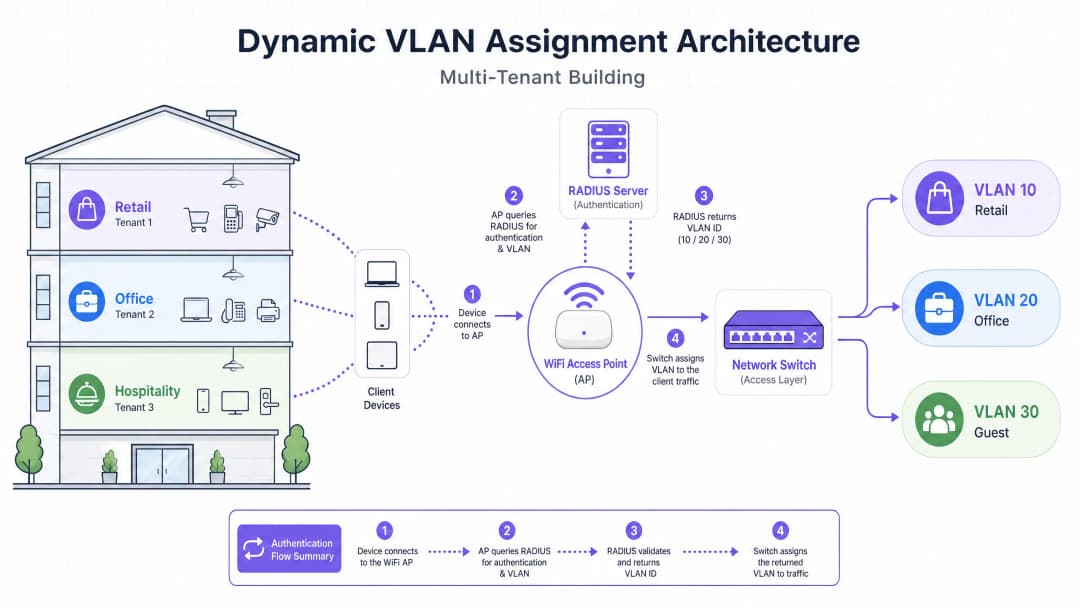
動態 VLAN 指派將區隔邏輯從 RF 層轉移到驗證層。它依賴 IEEE 802.1X 標準進行基於連接埠的網路存取控制,並與 RADIUS 伺服器整合。
該架構主要由三個部分組成:
- 用戶端(Supplicant): 請求網路存取的用戶端裝置(筆記型電腦、智慧型手機)。
- 驗證者(Authenticator): 網路存取裝置,通常是 WiFi 基地台或無線控制器,在驗證成功之前會阻擋流量。
- 驗證伺服器(Authentication Server): RADIUS 伺服器,負責對照身分儲存庫(例如 Active Directory、LDAP)來驗證憑證並制定網路原則。
驗證流程
當用戶端嘗試連接至整合的 SSID 時,會進行以下流程:
- EAPOL 初始化: 請求端(supplicant)連線至 AP。AP 會阻擋除了 LAN 上的可延伸驗證協定(EAPOL)封包之外的所有流量。
- RADIUS Access-Request: AP 將 EAP 資料封裝,並將其作為
Access-Request轉發至 RADIUS 伺服器。 - 憑證驗證: RADIUS 伺服器驗證使用者憑證(透過 EAP-TLS、PEAP 等方式)。
- RADIUS Access-Accept: 驗證成功後,RADIUS 伺服器會以
Access-Accept訊息進行回應。至關重要的是,此訊息包含特定的 IETF 標準 RADIUS 屬性,用以指示 AP 應將使用者分配到哪個 VLAN。
動態 VLAN 分配所需的關鍵 RADIUS 屬性為:
Tunnel-Type(64):設定為VLAN(值 13)Tunnel-Medium-Type(65):設定為802(值 6)Tunnel-Private-Group-ID(81):設定為特定的 VLAN ID(例如:租戶 A 的「20」、租戶 B 的「30」)
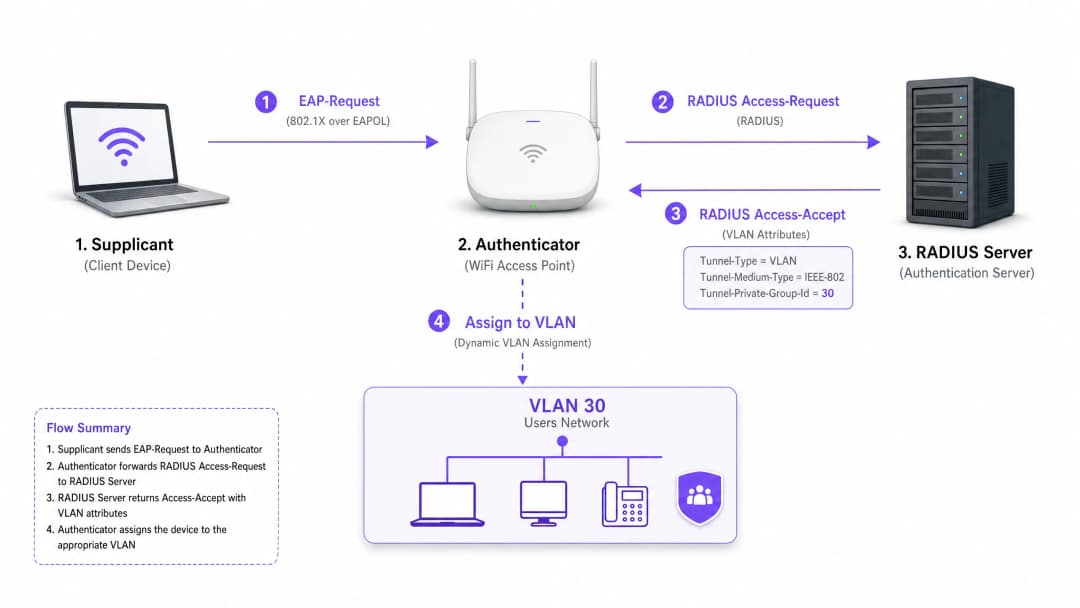
當 AP 收到這些屬性後,會直接將使用者的流量導入指定的 VLAN。接著,上游網路交換器就會處理這些流量,如同使用者實體插入該租戶的專用連接埠一樣,以確保完全的 Layer 2 隔離。
對於您的特定設置有任何疑問嗎?
我們的團隊與超過 80,000 個場域的場域營運商、IT 經理和網路工程師合作。立即預約 20 分鐘的通話,我們將向您展示其他與您相似的用戶是如何解決此問題的。
實作指南
部署動態 VLAN 分配需要無線基礎設施、邊緣交換器與識別提供者之間的密切配合。請遵循以下與供應商無關的實作順序。
階段 1:網路基礎設施準備
- VLAN 佈署: 在您的核心路由基礎設施與 DHCP 伺服器上定義並建立所需的 VLAN。確保每個租戶 VLAN 都擁有自己獨立的子網與適當的路由策略(例如:路由至網際網路,但丟棄跨 VLAN 流量)。
- 交換器 Trunking 串接: 這是至關重要的步驟。連接到您 Access Point 的交換器連接埠必須設定為 802.1Q trunk 連接埠。您必須為 AP 可能需要分配的所有潛在租戶 VLAN 加上標籤(tag)。如果 RADIUS 伺服器分配了 VLAN 40,但交換器連接埠上未對 VLAN 40 進行標籤,則用戶端將會通過驗證,但無法取得 IP 位址。
- AP 設定: 將 AP 設定為廣播單一啟用 802.1X 的 SSID(例如:WPA3-Enterprise)。在您的無線控制器或 AP 上啟用特定設定,以允許它們接受 RADIUS 覆寫屬性(通常標記為「AAA Override」或「Dynamic VLAN」)。
階段 2:RADIUS 與識別整合
- 識別存放庫整合: 將您的 RADIUS 伺服器連接到包含使用者識別及其租戶關聯的目錄服務。
- 網路策略建立: 在 RADIUS 伺服器中建立將使用者群組對應到 VLAN ID 的策略。例如,一項策略聲明:如果使用者屬於「Retail_Staff」群組,則傳回 Tunnel-Private-Group-ID = 10。
- 憑證管理: 如果使用 EAP-TLS(推薦用於企業設備),請部署用戶端憑證。如果使用 PEAP-MSCHAPv2(常用於 BYOD),請確保在 RADIUS 伺服器上安裝了有效且受信任的伺服器憑證。
階段 3:測試與分階段部署
- 試點測試: 對跨不同租戶的一小組設備進行測試。確認連接後,設備從正確的子網路獲取 IP 位址,且無法 ping 通其他租戶 VLAN 中的設備。
- IoT 及無介面設備: 對於不支持 802.1X 的設備(印表機、智慧電視),請實施 MAC 驗證旁路 (MAB)。RADIUS 伺服器會根據設備的 MAC 位址進行驗證並分配相應的 VLAN。注意:由於 MAC 位址可能被偽造,請將這些設備放置在嚴格隔離的 VLAN 中。
最佳實踐
- 整合 SSID: 建議最多設定三個 SSID:一個適用於所有租戶的 802.1X SSID,一個適用於舊版 IoT 設備(使用 PSK 或 MAB)的 SSID,以及一個用於 Guest WiFi(使用 Captive Portal)的 SSID。
- 強制執行用戶端隔離: 在訪客網路和不受信任的租戶網路中,在 AP 層級啟用 Layer 2 用戶端隔離,以防止設備之間相互通訊,從而降低橫向移動的風險。
- 利用進階分析: 將您的驗證流程與強大的 WiFi Analytics 平台整合,以深入瞭解場地利用率、停留時間和租戶網路效能。
- 標準化 WPA3: 在用戶端支援的情況下,強制對 802.1X SSID 使用 WPA3-Enterprise,以確保最高層級的加密並防止字典攻擊。
- 產業背景: 根據垂直產業量身客製部署。在 零售 環境中,確保 POS 系統處於嚴格隔離的 VLAN 中,以維持 PCI-DSS 合規性。在 旅宿餐飲 環境中,確保訪客 VLAN 與後勤維運完全隔離。
疑難排解與風險緩釋
常見故障模式
- 「已驗證但無 IP」情境:
- 症狀: 用戶端已連接,驗證成功,但設備自行分配了 APIPA 位址 (169.254.x.x)。
- 根本原因: RADIUS 伺服器分配了 VLAN,但該 VLAN 未在 DHCP 伺服器上建立,或者更常見的是,連接交換器與 AP 的 Trunk 連接埠未標記該 VLAN。
- 修正方法: 驗證邊緣交換器上的 802.1Q Trunk 設定。
- RADIUS 逾時 / 無法連線:
- 症狀: 用戶端卡在「正在連線...」或重複提示輸入憑據。
- 根本原因: AP 無法連線至 RADIUS 伺服器,或者 AP 與伺服器之間的 RADIUS 共用金鑰不相符。
- 修正方法: 驗證 AP 管理 IP 與 RADIUS 伺服器之間的網路連線。再次檢查共用金鑰。
- 憑證過期:
- 常見症狀: 所有使用 PEAP 或 EAP-TLS 的使用者突然大範圍發生驗證失敗。
- 根本原因: RADIUS 伺服器憑證已過期,導致用戶端拒絕連線。
- 解決方案: 針對 RADIUS 憑證實施嚴格的監控與警報機制。至少在過期前 30 天更新憑證。
風險緩解策略
- 故障開放 (Fail-Open) 與 故障關閉 (Fail-Closed): 明確定義當無法連線至 RADIUS 伺服器時的應對原則。對於企業租戶網路,基於安全考量,必須採用故障關閉(拒絕存取)。對於訪客存取,您可以設定故障開放原則,將使用者移至受高度限制、僅限網際網路的「隔離」VLAN。
- 備援機制: 務必將 RADIUS 伺服器部署為高可用性 (HA) 雙機架構,若支援多個場域,建議採用地理分佈式部署。
投資報酬率 (ROI) 與業務影響
為場域營運商實施動態 VLAN 分配能帶來顯著且可衡量的業務成果:
- 降低營運成本 (OpEx): 集中管理單一 SSID,可大幅減少與配置、更新和排除個別租戶網路故障相關的 IT 開銷。
- 優化射頻頻譜: 消除過多的 SSID 可收回寶貴的空口時間。如需管理頻譜的指南,請參閱我們的文章 Wi Fi Frequencies: A Guide to Wi-Fi Frequencies in 2026。這能帶來更高的傳輸吞吐量,並減少關於「WiFi 速度慢」的支援工單。
- 增強安全與合規性: 嚴格的 Layer 2 隔離可確保單一租戶網路遭受入侵時不會擴散到其他網路。這對於滿足 PCI-DSS 和 GDPR 等法規要求至關重要。
- 擴充性: 導入新租戶時,無需對實體基礎設施或無線設定進行任何變更;只需在 RADIUS 伺服器中建立新原則即可。
如需了解在共享空間設計網路的更全面策略,請參閱我們的指南 Designing a Multi-Tenant WiFi Architecture for MDU。
關鍵定義
802.1X
一種用於基於連接埠之網路存取控制的 IEEE 標準,為希望連線到 LAN 或 WLAN 的裝置提供驗證機制。
允許網路在授予存取權限之前要求驗證身分的基礎協定,從而實現動態原則。
RADIUS (Remote Authentication Dial-In User Service)
一種網路協定,為連線和使用網路服務的使用者提供集中式的驗證、授權和計費 (AAA) 管理。
驗證憑證並告知網路應向使用者指派哪個 VLAN 的決策引擎。
Supplicant
請求存取網路並提供憑證的用戶端裝置(例如筆記型電腦、智慧型手機)或軟體。
必須設定為支援 802.1X 的端點(例如,在 WiFi 設定中選擇 PEAP 或 EAP-TLS)。
Authenticator
透過在 Supplicant 與驗證伺服器之間轉發訊息來促進驗證過程的網路裝置(例如 WiFi 存取點或交換器)。
在 RADIUS 允許之前封鎖流量,然後套用所指派 VLAN 的守門者。
EAP (Extensible Authentication Protocol)
一種常用於無線網路和點對點連線的驗證框架,支援多種驗證方法(例如 EAP-TLS、PEAP)。
Supplicant 與 RADIUS 伺服器之間用於安全交換憑證的通用語言。
MAB (MAC Authentication Bypass)
一種透過使用 MAC 位址作為憑證,對不支援 802.1X 的設備進行驗證的技術。
用於在多租戶環境中引導舊版 IoT 設備、印表機或智慧電視上網。
Tunnel-Private-Group-ID
用於將 VLAN ID 從 RADIUS 伺服器傳輸到驗證器的特定 RADIUS 屬性(屬性 81)。
實際決定用戶被分配到哪個網路區段的關鍵數據。
Layer 2 Isolation
一種安全措施,可防止同一網路區段或 VLAN 上的設備直接互相通訊。
對於訪客網路和不可信的租戶網路至關重要,可防止惡意軟體的橫向移動或未授權的存取。
範例
一個大型會議中心同時舉辦三個活動。活動 A 需要安全的企業存取權限,活動 B 需要為與會者提供開放式存取權限,而活動 C 需要存取特定的內部簡報伺服器。網路架構師應該如何使用動態 VLAN 進行部署?
架構師為員工和安全的與會者設定單一的 802.1X SSID,並為一般訪客設定帶有 Captive Portal 的獨立開放式 SSID。
針對 802.1X SSID,RADIUS 伺服器設定了以下三條原則:
- 如果使用者群組 = 'Event_A_Staff',則指派 VLAN 100(網際網路 + 企業 VPN 存取)。
- 如果使用者群組 = 'Event_C_Presenters',則指派 VLAN 102(網際網路 + 簡報伺服器存取)。
針對活動 B,與會者使用開放的訪客 SSID,這會將他們放入 VLAN 101(僅限網際網路,並啟用用戶端隔離)。
一家零售連鎖店在共享大樓內營運,其中包含咖啡廳、服飾店和藥局。藥局必須符合 HIPAA 規範,服飾店則需要符合 PCI-DSS 規範以使用其無線 POS 終端機。如何保證隔離?
IT 團隊部署了單一的 WPA3-Enterprise SSID。
練習題
Q1. 租戶回報他們可以成功驗證並連線到 802.1X SSID,但他們的設備自行分配了 IP 位址 (169.254.x.x) 且無法連線上網。最可能的設定錯誤是什麼?
提示:思考基地台與核心網路服務之間的路径。
查看標準答案
最可能的原因是 RADIUS 伺服器分配的 VLAN 未在連接邊緣交換器與基地台的 802.1Q trunk 連接埠上標記(tagged)。基地台正嘗試將流量引導至正確的 VLAN,但交換器丟棄了這些訊框,因為該連接埠未設定為接收該 VLAN 的流量。
Q2. 您正在為共享辦公空間設計多租戶網路。客戶希望為 15 個租戶中的每一個廣播一個專屬的 SSID,以「方便他們找到自己的網路」。您會給客戶什麼建議?
提示:考慮管理訊框開銷對射頻效能的影響。
查看標準答案
強烈建議客戶不要採取這種方法。廣播 15 個 SSID 會消耗大量的訊標訊框空口時間(beacon frames airtime),從而嚴重降低網路效能、增加延遲並減少所有用戶的吞吐量。建議佈署單一 802.1X SSID,並透過 RADIUS 使用動態 VLAN 分配(Dynamic VLAN Assignment)在後端安全地隔離租戶。
Q3. 多租戶大樓需要為多個不支援 802.1X 請求方(supplicants)的無周邊 IoT 設備(例如:智慧恆溫器、數位看板)提供網路存取。如何將這些設備安全地引導至正確的租戶 VLAN?
提示:考慮 RADIUS 支援的其他驗證方法。
查看標準答案
實作 MAC 驗證繞過(MAB)。基地台將向 RADIUS 伺服器傳送該設備的 MAC 位址作為帳號和密碼。您可以將 RADIUS 伺服器設定為識別這些特定的 MAC 位址並傳回對應的 VLAN ID。由於 MAC 位址可以被偽造,因此應將這些設備放置在嚴格隔離且網路存取權限受限的 VLAN 中。
繼續閱讀本系列
管理學生宿舍網路中的頻寬
本指南為 IT 經理、網路架構師和物業營運總監提供了一個與廠商無關的技術參考,用於在高度密集的學生宿舍環境中管理 WiFi 頻寬。它涵蓋了 VLAN 分割、服務品質(QoS)策略設計、基於身分識別的流量整形以及應用程式層可見性 - 這是具備擴充性、公平存取網路的四大支柱。憑藉實際部署案例、可衡量的成果和決策框架,這是任何負責大規模住宅網路基礎設施團隊的營運手冊。
公寓與共享工作空間的 WPA2-Enterprise 與 Personal 比較
這份權威的技術參考指南針對公寓和共享工作空間等多租戶環境,評估了 WPA2-Enterprise 與 WPA2-Personal 的優劣。它為網路架構師和 IT 經理提供了關於 802.1X 驗證、動態 VLAN 分配和安全合規性的實用見解,證明了為什麼共享密碼會在現代共享場域中引入無法接受的風險。場域營運商將找到具體的實施指南、真實案例研究和投資報酬率分析,以支持在本季度做出遷移決策。
微分割在共享 WiFi 網路中的最佳實踐
本技術參考指南提供了在共享 WiFi 基礎設施上實施微分割的可行策略。它詳細說明了 IT 管理員和網路架構師如何安全地隔離訪客、IoT 和員工流量,以降低風險、確保合規性並最佳化網路效能。
對於您的特定設置有任何疑問嗎?
我們的團隊與超過 80,000 個場域的場域營運商、IT 經理和網路工程師合作。立即預約 20 分鐘的通話,我們將向您展示其他與您相似的用戶是如何解決此問題的。