
排除 802.1X 驗證失敗故障 (RADIUS/EAP)
在企業級 WiFi 網路中解決 802.1X、EAP-TLS、PEAP 與 RADIUS 驗證錯誤的循序漸進診斷指南。
Video overview
收聽此指南
查看播客逐字稿
核心系列的一部分:企業級 WiFi 安全指南 →
802.1X & RADIUS authentication failure diagnostic tool
Select your failure component stage, error scenario, and network vendor to generate exact root-cause analysis, packet-level diagnostics, and vendor-specific CLI verification commands.
Observed symptom
The access point transmits RADIUS Access-Request datagrams to the authentication server over UDP 1812, but receives zero response, causing client timeouts and fallback states.
Technical root cause
RADIUS shared secret mismatch between the Network Access Server (NAS IP) and RADIUS server, intermediate firewall blocking UDP ports 1812/1813, missing NAS IP definition in the RADIUS clients table, or RADIUS server service freeze.
Automate 802.1X and eliminate authentication downtime
Purple Cloud RADIUS and automated certificate lifecycle management eliminate shared secret mismatches, expired certificate outages, and complex on-premises server maintenance across Cisco, Aruba, Ruckus, and Meraki.

執行摘要
對於管理飯店、零售連鎖、體育場館和公共部門場地之企業 WiFi 的 IT 主管而言,802.1X 驗證是網路存取控制的骨幹 - 當其失效時,其影響是立即且嚴重的營運衝擊。單一設定錯誤的用戶端 (Supplicant) 設定檔、過期的 RADIUS 憑證或不匹配的共用金鑰,都可能同時阻斷數百名使用者,進而引發支援呈報、營收損失以及潛在的合規性違規。
IEEE 802.1X 定義了基於連接埠的網路存取控制,運作於 OSI 模型的第二層 (Layer 2)。它與可延伸驗證協定 (EAP) 和 RADIUS 伺服器協同運作,在授予網路存取權限之前先驗證每台設備。該協定支援多種 EAP 方法 - 包括 EAP-TLS、PEAP-MSCHAPv2、EAP-TTLS 和 EAP-FAST - 每種方法都有其獨特的安全性設定檔、憑證要求和營運複雜性。
本指南提供了一個結構化的診斷框架,用於解決跨越三個元件驗證鏈的 802.1X 失敗問題:用戶端 (Supplicant,終端設備)、驗證器 (Authenticator,無線存取點或交換器) 以及驗證伺服器 (Authentication Server,RADIUS)。其中包含實際案例研究、快速分流決策樹、符合 PCI-DSS v4.0 和 WPA3-Enterprise 標準的實作最佳實踐,以及取材自旅宿業和零售業部署的實作範例庫。
對於在員工網路旁部署 Guest WiFi 的企業而言,深入了解 802.1X 在何處中斷以及如何快速修復,是一項直接關係到營運與商業層面的首要任務。
技術深度剖析
802.1X 驗證架構
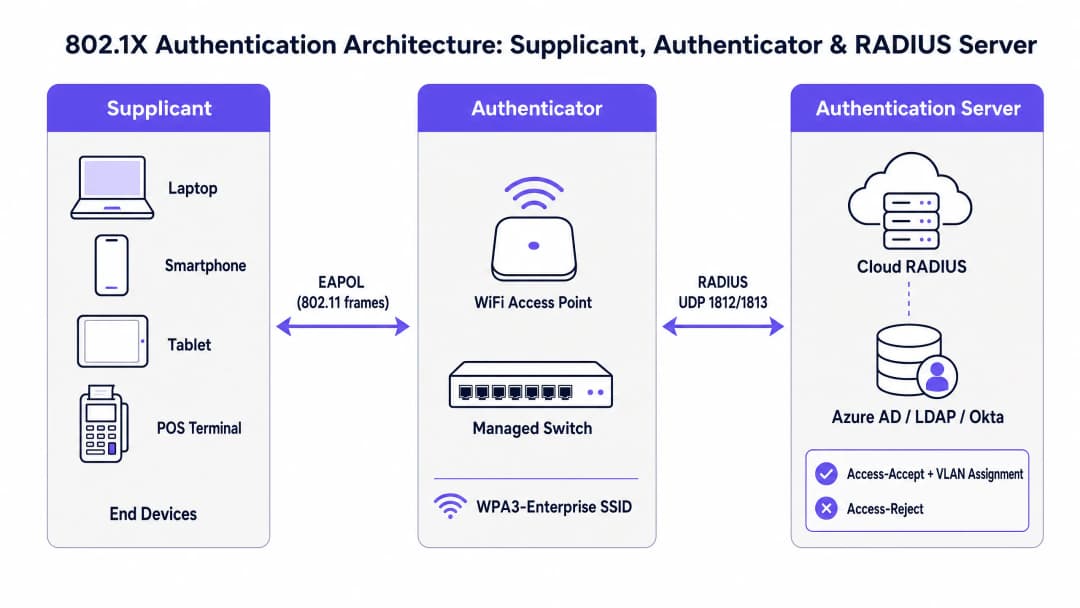
IEEE 802.1X 標準定義了一個三元件模型,用於規範每次企業 WiFi 驗證交換。深入理解各元件的角色是進行有效故障排除的前置條件。
用戶端 (Supplicant) 是終端使用者設備 - 如筆記型電腦、智慧型手機、平板電腦或銷售點 (POS) 終端。它運行一個軟體元件 (內建於 Windows、macOS、iOS 和 Android 作業系統中的用戶端程式),負責發起 EAP 交換並向網路提供認證資料。用戶端設定 - 特別是 EAP 方法、憑證信任設定和認證資料來源 - 是最常見的驗證失敗原因之一。
驗證器 (Authenticator) 是無線基地台或網管型交換器。關鍵在於,驗證器本身不做出驗證決策。它扮演無狀態中繼的角色,在 RADIUS 伺服器發出授權決策之前,阻擋受控連接埠上的所有資料流量。它在無線或有線介質上使用 EAPOL (EAP over LAN) 框架與請求者進行通訊,並在 UDP 連接埠 1812 (驗證) 和 1813 (計費) 上使用 RADIUS Access-Request 和 Access-Accept/Reject 封包與 RADIUS 伺服器進行通訊。
驗證伺服器 (Authentication Server) 即為 RADIUS 伺服器。這是進行實際憑證驗證的地方。RADIUS 伺服器與請求者協商 EAP 方法,對照身分目錄 (Active Directory、Azure AD、Okta 或 LDAP) 驗證憑證,並傳回帶有選用 VLAN 指派屬性的 Access-Accept,或傳回帶有原因代碼的 Access-Reject。在現代部署中,這越來越多是雲端託管服務 - 請參閱 如何使用 Cloud RADIUS 實作 802.1X 驗證 以取得完整的實作指南。
EAP 方法比較

EAP 不是單一的驗證方法,而是一個支援多種內部方法的框架。EAP 方法的選擇會直接影響安全狀況、憑證基礎架構需求,以及您可能遇到的失敗類型。
| EAP 方法 | 憑證需求 | 安全等級 | 部署複雜度 | 主要使用場景 |
|---|---|---|---|---|
| EAP-TLS | 雙向 (用戶端 + 伺服器) | 最高 | 高 (需要 PKI + MDM) | 受管公司裝置 |
| PEAP-MSCHAPv2 | 僅伺服器端 | 中 | 中 | AD 整合環境 |
| EAP-TTLS | 僅伺服器端 | 中 | 中 | 混合作業系統 BYOD 環境 |
| EAP-FAST | 無 (使用 PAC) | 中至高 | 低 | 舊版裝置支援 |
針對受管的公司裝置群,搭配 EAP-TLS 的 WPA3-Enterprise 是目前業界的最佳實踐。對於並行部署 Guest WiFi 和員工網路的場所 - 這在 旅宿業 和 零售業 環境中很常見 - 通常會採用混合做法:企業裝置使用 EAP-TLS,訪客則使用具有 RADIUS 後端的 Captive Portal。
驗證流程:逐步說明
理解 802.1X 交換的精確順序對於精確定位失敗發生的位置至關重要。其流程如下:
- 請求者與 SSID 建立關聯。驗證器開啟一個受控連接埠,阻擋所有非 EAP 流量。
- 驗證器向請求者傳送 EAP-Request/Identity。
- 請求者傳回 EAP-Response/Identity (使用者或裝置身分) 作為回應。
- 驗證器(Authenticator)將其封裝在 RADIUS Access-Request 中,並轉發給 RADIUS 伺服器。
- RADIUS 伺服器發送 Access-Challenge,建議 EAP 方法(例如 EAP-TLS 或 PEAP)。
- 請求端(Supplicant)與 RADIUS 伺服器協商 EAP 方法,並透過驗證器轉發,進行多次 Access-Request / Access-Challenge 來回互動以交換憑證。
- RADIUS 伺服器比對身分目錄驗證憑證,並傳回 Access-Accept(帶有選用的 VLAN 分配屬性)或 Access-Reject(帶有原因代碼)。
- 如果接受,驗證器會開啟受控埠,裝置即可存取網路。對於 WPA2/WPA3-Enterprise,隨後會進行 4 向交握(4-Way Handshake)以產生工作階段加密金鑰。
此程序中任何步驟的失敗都會產生不同的症狀特徵。將症狀對應到步驟是快速分流的基礎。
常見故障模式與診斷指標
故障模式 1:憑證過期(伺服器或用戶端)
這是實際運作的 802.1X 部署中最具破壞性的單一故障模式。當 RADIUS 伺服器的 TLS 憑證過期時,所有用戶端會同時驗證失敗 - 導致完全的網路中斷。當用戶端憑證過期時(在 EAP-TLS 部署中),個別裝置會失敗,而其他裝置則繼續正常驗證。
診斷指標: NPS/RADIUS 事件記錄顯示原因代碼 22("用戶端憑證已過期或尚未生效")或原因代碼 16("由於使用者認證不符,驗證失敗")。在 Windows NPS 上,請檢查安全性事件記錄中的事件識別碼 6273。在 FreeRADIUS 上,請在偵錯輸出中尋找 TLS Alert read:fatal:certificate expired。
解決方案: 續約過期的憑證,並透過 MDM 將更新後的 CA 憑證推送到所有用戶端。實施設定 90 天警示閾值的自動化憑證過期監控。
故障模式 2:RADIUS 共用金鑰(Shared Secret)不符
共用金鑰用於驗證驗證器與 RADIUS 伺服器之間的 RADIUS 訊息。不符會導致 RADIUS 伺服器靜默捨棄 Access-Request 封包。從 AP 的角度來看,RADIUS 伺服器會顯得無回應。
診斷指標: AP 記錄顯示 RADIUS 伺服器逾時與重新傳送。RADIUS 伺服器上則沒有顯示對應失敗嘗試的記錄項目 - 請求在處理之前就被捨棄。在 RADIUS 伺服器介面上進行 Wireshark 擷取,將會顯示通訊埠 1812 上傳入的 UDP 封包被靜默捨棄。
解決方案: 驗證並同步驗證器(AP/控制器設定)與 RADIUS 伺服器(NAS 用户端設定)上的共用金鑰。使用至少 32 個字元的強力隨機產生金鑰。針對雲端 RADIUS 部署,實施 RadSec(RADIUS over TLS)以消除對共用金鑰的依賴。
故障模式 3:請求端(Supplicant)設定檔設定錯誤
在 PEAP-MSCHAPv2 部署中,必須將用戶端設定為針對信任的 CA 驗證 RADIUS 伺服器的憑證。如果停用憑證驗證 - 這是初始部署時常見的捷徑 - 網路將容易受到惡意 AP 認證收集攻擊。如果信任了錯誤的 CA,或者如果伺服器憑證 CN/SAN 與設定的伺服器名稱不符,驗證將會失敗。
診斷指標: 個別裝置失敗,而其他裝置成功。RADIUS 記錄顯示 EAP-TLS 交握失敗或 PEAP 通道建立失敗。在 Windows 上,操作記錄中的 WLAN-AutoConfig 事件識別碼 8001 或 8002 表示 supplicant 端失敗。
解決方案: 透過 MDM(Microsoft Intune、Jamf 或同等軟體)部署標準化的 WiFi 設定檔。確保設定檔中包含信任的 CA 憑證,並強制執行伺服器憑證驗證。切勿在生產環境中停用憑證驗證。
失敗模式 4:網路傳輸問題(MTU 分段)
EAP-TLS 交換涉及完整憑證鏈的傳輸,這可能會產生大型的 RADIUS 封包。如果驗證器與雲端 RADIUS 伺服器之間的 WAN 路徑具有較低的 MTU(在某些 MPLS 或 SD-WAN 設定中很常見),這些封包可能會被分段。許多防火牆和狀態檢測裝置會捨棄分段的 UDP 封包,導致 TLS 交握無預警停頓。
診斷指標: 在透過 WAN 連線的站點上,EAP-TLS 驗證會間歇性或持續性失敗,而具有本機 RADIUS 的站點則成功。封包擷取顯示 RADIUS Access-Request 封包在 WAN 介面上被分段。當 RADIUS 伺服器在區域 LAN 上時,驗證成功。
解決方案: 部署 RadSec(TCP 連接埠 2083 上的 RADIUS over TLS)。TCP 本生就支援處理分段和重新傳送,可完全消除此失敗模式。或者,調整 WAN 介面上的 MTU 或在伺服器上設定 RADIUS 分段參數。
失敗模式 5:身分識別目錄連線失敗
RADIUS 伺服器必須能夠連線到身分識別目錄(Active Directory、LDAP、Azure AD)以驗證憑證。DNS 失敗、防火牆規則變更或網域控制站停機都將導致所有驗證嘗試失敗,即使 RADIUS 服務本身運作正常也是如此。
診斷指標: RADIUS 伺服器記錄顯示已收到驗證嘗試,但失敗並出現「無法聯絡 LDAP 伺服器」或同等錯誤。NPS 事件識別碼 6273,原因代碼為 16 或 66。如果未明確監控目錄連線,RADIUS 伺服器自身健康狀況監控可能不會呈現此問題。
解決方案: 針對 RADIUS 到目錄的連線路徑實施專用的健康狀況監控。設定多個網域控制站或 LDAP 複本做為容錯轉移目標。對於雲端 RADIUS 部署,請確保身分識別提供者整合(Azure AD Connect、LDAP 代理程式)已納入您的可用性監控中。
對於您的特定設置有任何疑問嗎?
我們的團隊與超過 80,000 個場域的場域營運商、IT 經理和網路工程師合作。立即預約 20 分鐘的通話,我們將向您展示其他與您相似的用戶是如何解決此問題的。
導入指南
第一階段:部署前驗證
在大規模部署 802.1X 之前,請先驗證以下必要條件。跳過此階段是導致部署後失敗的主要原因。
首先,確認您的 RADIUS 伺服器憑證是由您資產中所有用戶端裝置平台所信任的憑證授權單位(CA)核發的。在 Windows 上,這表示 CA 必須位於「受信任的根憑證授權單位」儲存庫中。在 iOS 和 Android 上,必須透過 MDM 設定檔明確發布 CA 憑證。請勿在生產環境中使用自我簽署憑證。
其次,驗證所有認證器(AP 和交換器)與 RADIUS 伺服器之間在 UDP 連接埠 1812 和 1813 上的網路連線。在部署到生產環境的 SSID 之前,請使用 RADIUS 測試用戶端(例如 Linux 上的 radtest 或 Windows 上的 NPS 測試工具)來確認端對端驗證。
第三,驗證您的身分識別目錄整合。確認 RADIUS 伺服器可以對您的目錄執行 LDAP 綁定和群組成員資格查詢。使用服務帳戶進行測試,並驗證在 Access-Accept 回應中是否傳回預期的 VLAN 分配屬性。
第二階段:EAP 方法選擇與憑證策略
對於受管理的企業裝置,請部署 EAP-TLS,並透過 MDM 發布用戶端憑證。這可以消除憑證遭竊的風險,並提供最強大的驗證防護。請確保您的 MDM 平台已設定為在到期前自動更新用戶端憑證。
對於包含非受管理或 BYOD 裝置的環境,PEAP-MSCHAPv2 是最務實的選擇。在所有用戶端設定檔中強制執行伺服器憑證驗證。切勿在停用憑證驗證的情況下發布 WiFi 設定檔。
對於無法執行 802.1X 請求端(supplicant)的舊型裝置(IoT 感測器、舊款 POS 終端機),請實施 MAC 驗證旁路(MAB)作為遞補方案。將 MAB 裝置分配到受到高度限制的 VLAN,並設定明確的防火牆規則,將其網路存取權限僅限制在所需的服務中。
第三階段:部署與監控
採取分階段方式進行部署:先在 20 到 50 部裝置的受控群組中進行試點、驗證驗證記錄、確認 VLAN 分配,並在推廣到整個資產之前驗證計費紀錄。對於大型場域部署 - 體育場、會議中心、飯店 - 這種分階段的方法對於控制任何設定錯誤的波及範圍至關重要。
實施對以下項目的持續監控:RADIUS 伺服器憑證到期(在 90 天前警示)、RADIUS 伺服器可用性與回應時間、各 SSID 及站點的驗證成功/失敗率,以及身分識別目錄連線能力。對於受監管審計約束的 Healthcare(醫療保健)與 Retail(零售)環境,請確保 RADIUS 計費記錄保存達到所需的期限(在 PCI-DSS 規範下通常為 12 個月)。針對 交通運輸 與大型公共場所的部署,請考慮部署具備自動容錯移轉功能的備援 RADIUS 伺服器。單一 RADIUS 伺服器是整個網路存取控制基礎架構的單一故障點。
最佳實踐
以下最佳實踐係根據 IEEE 802.1X、WPA3-Enterprise 規範、PCI DSS v4.0 要求以及企業場域部署的營運經驗所制定。
憑證生命週期管理是最高優先級的營運控制措施。針對所有 RADIUS 伺服器憑證,實施自動化監控,並在到期前 90、60 和 30 天發出警示。對於 EAP-TLS 部署,請透過您的 MDM 平台將此監控延伸至用戶端憑證群。憑證到期是生產環境 802.1X 部署中導致大規模驗證中斷的首要原因。
RadSec 部署應作為任何 RADIUS 流量需經過公開網際網路或 WAN 的 802.1X 部署之預設設定。RadSec (RFC 6614) 將 RADIUS 封裝在 TCP 上的 TLS 中,提供傳輸安全、消除 UDP 邏輯分段問題,並移除對共用金鑰的依賴。大多數現代雲端 RADIUS 平台和企業級 AP 廠商均支援 RadSec。
MDM 強制執行的用戶端設定檔可消除 supplicant 設定錯誤的最大單一來源。所有公司擁有的裝置都應透過 MDM 接收其 WiFi 設定檔,而非手動設定。設定檔必須包含受信任的 CA 憑證、強制執行伺服器憑證驗證,並指定正確的 EAP 方法和內部驗證設定。
透過動態 VLAN 分配進行網路區隔是符合 PCI DSS 合規性的強制性控制措施,也是零信任網路架構的基石。設定 RADIUS 授權原則,以便根據群組成員資格將使用者分配到適當的 VLAN - 員工分配到企業 VLAN,訪客分配到隔離的僅限網際網路 VLAN,IoT 裝置分配到受限的管理 VLAN。這可限制任何單一受損裝置的影響範圍。
RADIUS 記帳記錄保留提供 PCI DSS 需求 10 所要求的稽核追蹤,對於安全性事件後的鑑識調查至關重要。確保記帳記錄擷取工作階段開始/停止事件、使用者身分識別、裝置 MAC 位址、分配的 VLAN、工作階段持續時間和資料傳輸量。將 RADIUS 記帳與您的 SIEM 整合,以進行即時異常偵測。
對於在部署 802.1X 的同時也部署 WiFi Analytics 的企業而言,單一使用者驗證資料與分析的結合提供了一個強大的營運情報層 - 可在個別工作階段層級進行停留時間分析、容量規劃和異常偵測。
疑難排解與風險緩釋
快速評估架構
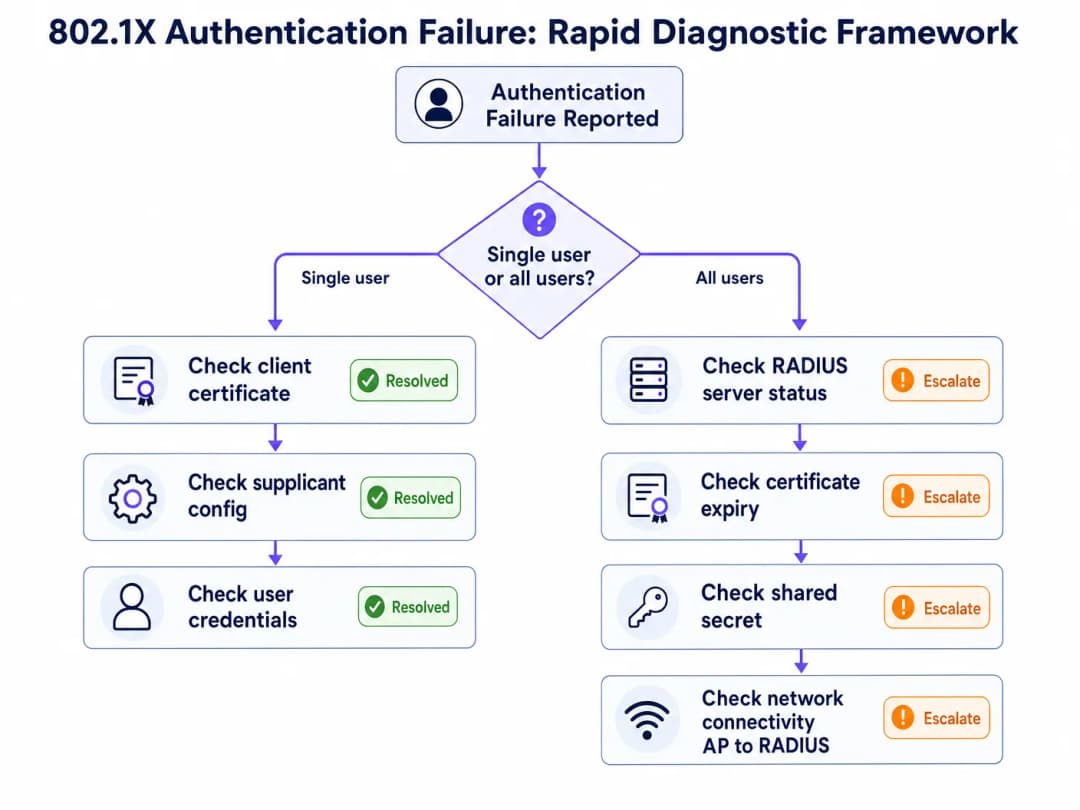
當收到 802.1X 驗證失敗的通報時,第一個診斷問題將決定整個疑難排解的路徑:這是影響單一使用者/裝置,還是會影響網路上的所有使用者?
如果失敗同時影響所有使用者,根本原因幾乎可以肯定是在基礎架構層級:例如 RADIUS 伺服器憑證過期、RADIUS 伺服器故障、變更設定後共用密鑰不符,或是驗證器(Authenticator)與 RADIUS 伺服器之間的連線中斷。請先檢查 RADIUS 伺服器的可用性與憑證有效性。
如果失敗僅影響單一使用者或裝置,根本原因幾乎可以肯定是在用戶端層級:例如用戶端憑證過期(EAP-TLS)、 supplicant 設定檔設定錯誤、認證資訊不正確,或是特定裝置的軟體問題。請先檢查用戶端的憑證儲存區與 supplicant 設定。
診斷工具組
以下工具對於在不同的基礎架構元件中進行 802.1X 疑難排解至關重要。
| 工具 | 平台 | 使用案例 |
|---|---|---|
| NPS 事件記錄(事件識別碼 6272/6273) | Windows Server | 包含原因代碼的 RADIUS 驗證成功/失敗記錄 |
| WLAN-AutoConfig 運作記錄 | Windows 用戶端 | 用戶端 EAP 交換失敗記錄 |
| CAPI2 事件記錄 | Windows 用戶端 | 憑證驗證失敗記錄 |
debug radius authentication |
Cisco IOS/WLC | 驗證器上的 RADIUS 交換偵錯 |
radiusd -X |
FreeRADIUS | 包含 EAP 協商的完整偵錯輸出 |
| Wireshark(EAPOL 篩選器) | 任何平台 | 用戶端 EAP 框架的封包擷取 |
| Wireshark(EAP 篩選器) | 任何平台 | 伺服器端 RADIUS 封包擷取 |
radtest |
Linux | 手動 RADIUS 驗證測試 |
NPS 原因代碼對照表
Microsoft NPS 事件識別碼 6273(驗證失敗)包含一個能直接指出失敗原因的「原因代碼」。在維運上最關鍵的代碼如下:
| 原因代碼 | 說明 | 可能的根本原因 |
|---|---|---|
| 16 | 由於使用者認證資訊不符,驗證失敗 | 密碼錯誤、用戶端憑證過期或目錄查詢失敗 |
| 22 | 用戶端憑證已過期或尚未生效 | 用戶端憑證過期 - 請檢查 MDM 憑證續期狀態 |
| 23 | 使用者帳戶已過期 | AD 帳戶過期 - 請檢查帳戶狀態 |
| 48 | 連線要求與任何已設定的原則皆不相符 | RADIUS 原則設定錯誤 - 請檢查 NPS 網路原則 |
| 66 | 使用者嘗試使用相符網路原則中未啟用的驗證方法 | 用戶端與伺服器之間的 EAP 方法不符 |
風險緩釋:憑證過期災難
最常見且最可預防的 802.1X 停機事件是 RADIUS 伺服器憑證過期。在 2025 年 1 月,一家大型連鎖零售商因其 RADIUS 伺服器憑證於週一凌晨 3:00 過期,導致員工網路完全中斷。到了上午 9:00,45 家分店中超過 300 台收銀終端機失去了網路連線。該憑證是在兩年前部署的,當時並未配置自動監控,且在團隊重組期間遺漏了更新提醒。
預防措施非常簡單:實施與您的告警平台(PagerDuty、OpsGenie 或同等工具)整合的自動憑證過期監控。將告警閾值設定為 90、60 和 30 天。在您的 IT 運維手冊中,將憑證更新指定為專人負責。對於雲端 RADIUS 平台,請確認服務供應商是否會代您管理憑證更新 - 這是託管服務與自助服務產品之間的一大核心差異。
投資報酬率與業務影響
身分驗證停機的成本
對於場域營運商而言,802.1X 身分驗證失敗會直接轉化為可衡量的業務影響。在 飯店餐飲 環境中,員工網路中斷會影響物業管理系統、收銀終端機和顧客服務。在 零售 行業中,收銀終端機身分驗證失敗會導致交易完全停擺。在會議中心和體育場,尖峰活動期間的身分驗證失敗會立即產生顯而易見的服務中斷。
在一家擁有 200 間客房的飯店中,一場 30 分鐘的身分驗證停機(影響 PMS 存取、餐廳收銀機和禮賓終端機)所造成的直接營運損失通常會超過 5,000 英鎊,這還不包括對顧客體驗的影響以及潛在的 SLA 罰款。
合規價值
對於適用 PCI DSS v4.0 的企業組織,妥善部署的 802.1X 架構能直接滿足多項規範要求:要求 1(網路存取控制)、要求 7(限制對系統組件的存取)、要求 8(識別使用者並驗證存取)以及要求 10(記錄並監控所有存取)。而替代方案(共享 PSK 網路)則無法滿足這四項要求,並會帶來顯著的審計風險。
對於受資料保護法規約束的公共部門組織和 醫療保健 部署,單一使用者身分驗證和完整的稽核日誌提供了證明符合存取控制義務所需的審計軌跡。
衡量成功指標
運作良好的 802.1X 部署其關鍵績效指標為:身分驗證成功率(目標 >99.5%)、平均身分驗證時間(雲端 RADIUS <150ms)、憑證過期事件(目標為零)以及 RADIUS 伺服器可用性(目標 99.9%)。這些指標應在您的網路管理平台中進行追蹤,並作為您網路營運流程的一環進行每月審查。 對於使用 WiFi Analytics 的組織而言,將 802.1X 單一使用者工作階段資料與分析相結合,可提供額外的商業智慧:準確的停留時間測量、裝置類型分佈以及網路利用模式,進而為容量規劃和場地營運決策提供依據。
如欲閱讀更多有關相關網路存取控制解決方案的資訊,請參閱 10 Best Network Access Control (NAC) Solutions for 2026 與 Cisco Wireless APs: 2026 Guide to Products & Deployment。針對學校和教育部署,WiFi in Schools: The 2026 Administrator & IT Guide 涵蓋了多使用者教育環境中的 802.1X 實作。
關鍵定義
802.1X
IEEE 802.1X 是一種基於連接埠的網路存取控制標準,定義了在 OSI 模型第 2 層運作的身分驗證框架。它會阻擋來自裝置的所有網路流量,直到 RADIUS 伺服器使用 EAP 作為憑證交換協定對其進行積極驗證。它同時適用於有線乙太網路和無線 (WiFi) 網路。
IT 團隊遇到 802.1X,主要是將其作為 WPA2-Enterprise 和 WPA3-Enterprise SSID 的驗證機制。它是啟用單一用戶驗證、動態 VLAN 分配,以及 PCI DSS 合規性所需稽核軌跡的標準。
RADIUS (Remote Authentication Dial-In User Service)
一種用戶端 - 伺服器網路協定 (RFC 2865),為網路存取提供集中式的驗證、授權和計帳 (AAA) 管理。在 802.1X 部署中,RADIUS 伺服器會比對身分目錄來驗證使用者憑證,並向 Authenticator 傳回 Access-Accept 或 Access-Reject 回應。它在 UDP 連接埠 1812 (身分驗證) 和 1813 (計帳) 上運作。
RADIUS 伺服器是 802.1X 中做出決策 CO-設計。當身分驗證失敗時,RADIUS 伺服器記錄中會包含識別根本原因的代碼。常見的實現包括 Microsoft NPS、FreeRADIUS 以及雲端代管服務。
EAP (Extensible Authentication Protocol)
一個協定框架 (RFC 3748),定義了 802.1X 中使用的一組身分驗證方法。EAP 本身不是一種身分驗證方法,而是一個支援多種內部方法的容器,這些內部方法包括 EAP-TLS、PEAP-MSCHAPv2、EAP-TTLS 和 EAP-FAST。EAP 方法是在 Supplicant 與 RADIUS 伺服器之間進行協商的;Authenticator 僅轉發 EAP 訊框,而不會對其進行解析。
EAP 方法的選擇決定了部署的安全態勢和營運複雜度。EAP-TLS 需要 PKI 和 MDM 基礎架構,但能提供最強的安全保護。PEAP-MSCHAPv2 部署起來較為簡單,但需要嚴格的憑證驗證以防止憑證被竊取。
Supplicant
終端使用者裝置(筆記型電腦、智慧型手機、POS 終端機)上的軟體元件,用於發起 802.1X 身分驗證交換。在 Windows 上,supplicant 作為 WLAN AutoConfig 或 Wired AutoConfig 服務內建於 OS 中。在 iOS 和 Android 上,它是透過裝置的 WiFi 設定檔設定來進行管理。
Supplicant 設定錯誤 - 特別是 PEAP 部署中停用了憑證驗證 - 是身分驗證失敗和安全性漏洞最常見的來源之一。透過 MDM 建立 Supplicant 設定標準化是一項關鍵的營運控制措施。
Authenticator
在 802.1X 部署中執行基於連接埠之存取控制的網路裝置(無線存取點或網管交換器)。Authenticator 本身不做出身分驗證決策 - 它是作為 Supplicant(使用 EAPOL)與 RADIUS 伺服器(使用 RADIUS)之間的轉發器。在 RADIUS 伺服器發出 Access-Accept 之前,它會阻擋受控連接埠上的所有非 EAP 流量。
Authenticator 的設定 - 特別是 RADIUS 伺服器 IP/主機名稱、共用金鑰和逾時設定 - 是常見的失敗來源。在基礎架構變更後,請務必驗證 Authenticator 的 RADIUS 用戶端設定是否與 RADIUS 伺服器的 NAS 用戶端設定相符。
EAPOL (EAP over LAN)
用於在有線或無線介質上,於 Supplicant 與 Authenticator 之間傳輸 EAP 訊框的協定。EAPOL 訊框為第 2 層訊框(Ethernet 類型 0x888E),不需要 IP 連線能力。Authenticator 會將 EAPOL 訊框封裝至 RADIUS 封包中,以轉發給身分驗證伺服器。
在用戶端進行 Wireshark 封包擷取時,可以看到 EAPOL。在無線封包擷取中篩選 EAPOL 訊框,可讓工程人員觀察 EAP 交換過程並找出是哪一個步驟導致身分驗證失敗。
RadSec (RADIUS over TLS)
RADIUS 協定的延伸(RFC 6614),其將 RADIUS 封包封裝在 TCP 連接埠 2083 上的 TLS 通道中。RadSec 為穿過不可信網路(例如從公用網際網路到雲端 RADIUS 伺服器)的 RADIUS 流量提供傳輸安全保護,消除了 UDP 分段問題,並移除了封包驗證對共用金鑰的依賴。
RadSec 是雲端 RADIUS 部署的建議傳輸方式。它能同時解決兩種常見的失敗模式:導致 EAP-TLS 交握失敗的 MTU 遭分段問題,以及跨分散站點之共用金鑰管理的複雜性。
Dynamic VLAN Assignment
一種 RADIUS 授權功能,允許 RADIUS 伺服器根據使用者的群組成員身分或裝置類型,指示驗證器將已驗證的裝置分配到特定的 VLAN。RADIUS 伺服器會在 Access-Accept 回應中傳回 VLAN 分配屬性(Tunnel-Type、Tunnel-Medium-Type、Tunnel-Private-Group-ID)。
Dynamic VLAN assignment 是在 802.1X 部署中強制執行網路分割的機制。這是符合 PCI-DSS 規範(隔離持卡人資料環境)的強制性控制措施,也是零信任網路架構的基石。RADIUS 策略中設定錯誤的 VLAN 屬性是導致使用者在驗證後被分配到錯誤網路區段的常見原因。
MAC Authentication Bypass (MAB)
一種後備驗證機制,允許沒有 802.1X 請求程式的裝置在 RADIUS 交換中,使用其 MAC 位址作為使用者名稱和密碼來進行驗證。由於 MAC 位址可以被偽造,MAB 提供的安全性保證極低,應僅用於確實無法支援 802.1X 的裝置。
傳統的物聯網裝置、舊型 POS 終端機和網路印表機通常需要 MAB。透過 MAB 驗證的裝置必須放置在具有明確防火牆規則且受高度限制的 VLAN 上。絕不要將 MAB 作為可支援 802.1X 裝置的便利捷徑。
NPS (Network Policy Server)
Microsoft 的 RADIUS 伺服器實作,隨附於 Windows Server。NPS 支援 PEAP-MSCHAPv2、EAP-TLS 和 EAP-TTLS,並與 Active Directory 原生整合以進行憑證驗證。驗證失敗會記錄到 Windows 安全性事件記錄中,事件 ID 為 6273(失敗)和 6272(成功),並附帶識別具體失敗原因的原因代碼。
NPS 是以 Windows 為中心的企業環境中部署最廣泛的 RADIUS 伺服器。NPS 伺服器上的安全性事件記錄是這些環境中診斷 802.1X 失敗的主要工具。請確保針對成功和失敗事件皆啟用 NPS 稽核策略。
範例
一家擁有 12 個據點、共 450 間客房的飯店集團在所有站點部署了採用 PEAP-MSCHAPv2 的 WPA2 企業級安全,並在每個位置使用內部部署的 Windows NPS 伺服器。在進行網路基礎架構更新後,IT 團隊回報其中三個站點的員工無法驗證登入公司 SSID。Captive Portal 網路上的訪客則不受影響。受影響站點的 NPS 伺服器正在運行,且 Windows 安全性事件記錄顯示事件識別碼為 6273,原因代碼為 16。最可能的起因是什麼?團隊應如何解決此問題?
NPS 事件識別碼 6273 的原因代碼 16 表示因憑證不符而導致驗證失敗 - 但在影響多個站點的基礎架構更新後故障之情境下,最可能的起因並非使用者密碼錯誤,而是新設定的無線基地台或無線控制器與 NPS 伺服器之間的 RADIUS 共用金鑰不符。
步驟 1:在其中一個受影響站點的 NPS 伺服器上,導覽至 RADIUS 用戶端和伺服器 > RADIUS 用戶端,並驗證為每個 AP 或無線控制器 IP 位址設定的共用金鑰。將其與 AP 或控制器上的 RADIUS 伺服器設定進行比對。
步驟 2:如果共用金鑰相符,請檢查 NPS 網路原則是否已正確設定為允許 PEAP-MSCHAPv2。導覽至原則 > 網路原則,開啟相關原則,並驗證 Microsoft: Protected EAP (PEAP) 是否已列為允許的驗證方法,且以 EAP-MSCHAPv2 作為內部方法。
步驟 3:如果原則正確,請檢查 NPS 連線要求原則以確認該要求正在本機處理(未轉寄至遠端 RADIUS 伺服器)。驗證條件是否與來自新 AP 硬體的內送 RADIUS 屬性相符。
步驟 4:在 AP 或控制器上啟用 RADIUS 計費偵錯,並驗證 Access-Request 封包是否已傳送到正確的 NPS 伺服器 IP 和連接埠 1812。如果沒有任何要求抵達 NPS 伺服器,則問題出在驗證器(Authenticator)設定,而非 RADIUS 伺服器。
步驟 5:如果要求已抵達 NPS 但因原因代碼 16 被拒絕,且憑證已確認無誤,請檢查 NPS 伺服器是否可連線至 Active Directory 網域控制站。若與網域控制站之間有 DNS 或連線問題,將會導致 NPS 以此原因代碼判定憑證驗證失敗。
解決方案:在大多數更新後的案例中,根本原因是在設定新 AP 硬體時引入了共用金鑰不符的問題。請在所有 RADIUS 用戶端和 NPS 伺服器之間同步共用金鑰。並可考慮移轉至 RadSec 以完全免除共用金鑰管理的工作。
一家擁有 85 家門市的大型零售連鎖店部署了 EAP-TLS,並透過 Microsoft Intune 管理用戶端憑證。在某個週一早上,IT 服務台收到大量來自門市經理的報告,指出員工設備無法連線到企業 WiFi 網路。此問題同時影響了所有門市。RADIUS 伺服器記錄顯示 Access-Reject 回應,並附帶訊息 "TLS Alert: certificate expired"(TLS 警示:憑證已過期)。RADIUS 伺服器本身運行正常,且其自身的憑證在未來的 18 個月內依然有效。請問發生了什麼事?緊急修復路徑為何?
RADIUS 伺服器記錄中的 "TLS Alert: certificate expired" 訊息,結合所有 85 家門市同時發生故障以及 RADIUS 伺服器憑證有效的事實,表明部署到員工設備的用戶端憑證已過期。在 EAP-TLS 中,用戶端和伺服器雙方都需要出示憑證。如果用戶端憑證已過期,RADIUS 伺服器將拒絕 TLS 握手並發出 Access-Reject。
緊急修復(0 到 2 小時):
步驟 1:在受影響的設備上檢查憑證過期日期以確認診斷。在 Windows 上,開啟 certmgr.msc,導覽至「個人」>「憑證」,然後檢查 WiFi 驗證憑證的過期日期。如果已過期,則確認了根本原因。
步驟 2:在 Microsoft Intune 中,導覽至「裝置」>「組態設定檔」,並找到用於 WiFi 驗證的 SCEP 或 PKCS 憑證設定檔。檢查憑證有效期和續期閾值設定。
步驟 3:如果憑證設定檔設定為自動續期,請檢查設備最近是否能夠存取 Intune 管理服務。如果設備處於離線狀態或未註冊,則可能未進行自動續期。
步驟 4:透過在 Intune 中觸發裝置同步(「裝置」>「所有裝置」>「同步」)來強制進行憑證續期。對於無法連線到 WiFi 的設備,請確保它們有替代的連線路徑(行動數據或有線乙太網路),以便連線到 Intune 服務進行續期。
步驟 5:作為憑證續期期間的臨時措施,可考慮為受影響的門市建立臨時的 PEAP-MSCHAPv2 SSID,以恢復營運能力。這應被視為臨時的過渡方案,而非永久性解決方案。
長期預防:
將 Intune 憑證設定檔設定在憑證剩餘壽命的 20% 時進行續期(例如,對於 1 年期的憑證,在到期前大約 73 天進行續期)。針對含有憑證過期原因代碼的 RADIUS Access-Reject 事件實施 SIEM 警示。將憑證過期監控納入您的每月 IT 營運審查中。
練習題
Q1. 您的組織營運著一個擁有 60,000 個座位的體育場,在看台通道、貴賓套房和後勤區域部署了 800 個存取點。員工裝置使用 EAP-TLS,並透過 Jamf 管理憑證。在一次大型活動期間,多個區域中 15% 的員工裝置報告驗證失敗。RADIUS 伺服器記錄顯示 Access-Reject 回應。其餘 85% 的員工則正常進行驗證。您的診斷方法為何?最可能的根本原因是什麼?
提示:部分失敗模式(15% 的裝置,而非全部)是關鍵的診斷訊號。請專注於區分失敗裝置與成功裝置的特徵 - 裝置型號、OS 版本、憑證核發日期或 Jamf 註冊狀態。
查看標準答案
部分故障的模式立即排除掉了基礎架構層級的原因(RADIUS 伺服器憑證過期、共用金鑰不相符或伺服器中斷會影響所有裝置)。根本原因幾乎可以肯定是一部分用戶端憑證已過期或無法更新。
診斷方法:擷取 RADIUS 伺服器記錄,並篩選 Access-Reject 事件。記下發生故障裝置的裝置識別資訊(憑證 CN 或 MAC 位址)。在 Jamf 中,對照憑證設定檔部署狀態交叉比對這些裝置。檢查發生故障的裝置是否具有共同的憑證發行日期,如果它們都是在同一批次中註冊的,則可能具有相同的過期日期。
最可能的根本原因:同一時間發行的一批用戶端憑證已達到過期日。較新註冊的裝置具有有效的憑證,且正正常進行驗證。
解決方案:在 Jamf 中識別受影響的裝置,並觸發憑證更新推送。確保憑證設定檔設定了適當的更新閾值(憑證生命週期的 20%)。對於無法透過 WiFi 存取 Jamf MDM 服務的裝置(因為它們無法進行驗證),請在事件期間提供臨時的有線乙太網路連線或臨時的 PEAP SSID。事件發生後,針對具有憑證過期原因碼的 RADIUS Access-Reject 事件實施 SIEM 警報,以防止再次發生。
Q2. 一家擁有 35 家分店的區域零售連鎖店正在從內部部署的 NPS 伺服器遷移到雲端 RADIUS 服務。在三家分店進行試行期間,EAP-TLS 驗證在兩家分店正常運作,但在第三家分店間歇性失敗。第三家分店透過 MPLS WAN 連結連線到雲端 RADIUS 服務。驗證失敗並非持續發生,有些嘗試成功,有些則失敗。雲端 RADIUS 供應商確認服務運作正常,且記錄顯示有部分 Access-Request 封包到達,但未傳送相應的 Access-Accept。最可能的原因是什麼?
提示:在特定連接 WAN 的站點上發生間歇性故障,加上雲端 RADIUS 供應商看到部分但非全部的封包,這強烈暗示了網路傳輸問題,而非設定錯誤。
查看標準答案
WAN 連線站點上的間歇性故障與雲端 RADIUS 供應商看到不完整的封包序列,這兩者的結合是 MTU 分割的典型特徵。EAP-TLS 憑證鏈會產生大型 RADIUS 封包,這可能會超過 MPLS WAN 連結的 MTU。當這些封包被分割時,雲端 RADIUS 伺服器可能會收到第一個片段,但收不到後續片段,導致 TLS 交握停滯並最終逾時。
診斷確認:在受影響分店的 WAN 介面上執行 Wireshark 擷取。篩選 連接埠 1812 上的 UDP 流量。在 RADIUS 交換中尋找被分割的 IP 封包。比較成功分店與失敗分店的封包大小。
解決方案選項 1(首選):將受影響的站點遷移到 RadSec(TCP 連接埠 2083 上的 RADIUS over TLS)。TCP 以原生方式處理分割與重傳,從而完全消除這種失敗模式。大多數雲端 RADIUS 供應商和現代 AP 廠商都支援 RadSec。
解決方案選項 2:降低受影響分店 WAN 介面上的 MTU,以符合 MPLS 路徑 MTU,確保 RADIUS 封包不會被分割。這是一個不夠優雅的解決方案,因為它會影響 WAN 連結上的所有流量。
解決方案選項 3:將 RADIUS 伺服器設定為使用較小的 TLS 記錄大小,以減少封包分割。這是某些 RADIUS 實作中可用的伺服器端設定選項。
長期建議:作為雲端 RADIUS 部署的一部分,將所有站點遷移到 RadSec。這可以消除分割風險、對傳輸中的 RADIUS 流量進行加密,並消除共用金鑰管理的複雜性。
Q3. 某會議中心 IT 總監正在規劃網路升級,以支援針對員工的 WPA3-Enterprise 搭配 802.1X,以及針對活動代表的 Captive Portal。該場地每年舉辦 200 場以上的活動,代表人數從 50 到 5,000 人不等。IT 團隊內部網路專業知識有限,且無現有的 PKI 基礎設施。總監希望為員工實施 802.1X,但擔心營運複雜性。應推薦哪種 EAP 方法?需要哪些基礎設施?以及需要緩解哪些關鍵營運風險?
提示:考量營運限制:內部專業知識有限、無現有 PKI,以及對可可靠維護之解決方案的需求。在安全需求與營運可行性之間取得平衡。
查看標準答案
鑑於營運限制 - 內部專業知識有限且無現有 PKI - 建議用於員工驗證的 EAP 方法是 PEAP-MSCHAPv2,而非 EAP-TLS。雖然 EAP-TLS 提供了卓越的安全性,但它需要 PKI 基礎設施和 MDM 平台來進行憑證分發。在沒有這些基礎設施的情況下,部署 EAP-TLS 會帶來巨大的營運風險:憑證過期管理會變成手動流程,且團隊缺乏在壓力下排除憑證鏈問題的專業知識。
PEAP-MSCHAPv2 直接與 Active Directory(或 Azure AD)整合,僅需要伺服器端憑證,且對於沒有深厚 PKI 專業知識的團隊來說,在營運上是可管理的。只要在所有用戶端裝置上嚴格執行伺服器憑證驗證,這種安全性折衷是可接受的 - 這是防止透過惡意存取點收集憑證的不可妥協的控制措施。
所需的基礎設施:雲端 RADIUS 服務(以避免內部部署伺服器管理)、來自 RADIUS 服務信任之公共 CA 的伺服器憑證、用於向員工裝置部署 WiFi 設定檔的 MDM 解決方案(Microsoft Intune 或同等方案),以及作為身分目錄的 Active Directory 或 Azure AD。
需要緩解的關鍵營運風險:
用戶端停用憑證驗證:透過 MDM 部署所有 WiFi 設定檔並強制執行憑證驗證。絕不允許在員工裝置上進行手動 WiFi 設定檔配置。
RADIUS 伺服器憑證過期:設定自動監控,並在 90 天前發出警示。使用雲端 RADIUS 服務時,請確認供應商是否管理憑證續期 - 這是關鍵的選擇標準。
大型活動期間的容量:確保雲端 RADIUS 服務的規模符合高峰期並行驗證負載。在 5,000 名代表的活動期間,如果員工裝置同時重新驗證(例如在網路重新啟動後),RADIUS 服務必須能夠處理突發流量。
訪客/員工網路隔離:確保 Captive Portal 訪客網路和 802.1X 員工網路處於不同的 VLAN 上,並在它們之間設定適當的防火牆規則。如果任何員工網路裝置處理付款卡資料,這是 PCI-DSS 的要求。
常見問題
Why does 802.1X authentication fail with an EAPOL timeout?
An EAPOL timeout occurs when the client transmits EAPOL-Start frames but receives no EAP-Request/Identity response from the authenticator (access point or switch). Common root causes include: the switch port or wireless SSID lacking an active 802.1X AAA method list, the access point losing CAPWAP or RADIUS connectivity to the controller, or the client operating system 802.1X supplicant service (such as Windows Wired AutoConfig dot3svc) being stopped or misconfigured.
What causes RADIUS Access-Reject errors during EAP-TLS authentication?
EAP-TLS Access-Reject errors typically stem from mutual certificate validation failures (TLS Alert 48 or Alert 46). Either the client device lacks the Root or Intermediate CA certificate that signed the RADIUS server certificate, or the RADIUS server cannot validate the client certificate due to an expired Certificate Revocation List (CRL) or unreachable OCSP responder. Other frequent causes include expired client certificates and missing Client Authentication Extended Key Usage (EKU) attributes.
Why does PEAP-MSCHAPv2 fail on Windows 11 enterprise endpoints?
Windows 11 22H2 and later versions enable Windows Defender Credential Guard by default. Credential Guard isolates LSASS and blocks legacy NTLMv2 and MS-CHAPv2 password-derived hashes from traversing the operating system, causing authentication to fail with RADIUS Reason 23 or Event 5402. Migrating from PEAP to passwordless EAP-TLS with hardware TPM-backed certificates resolves this incompatibility and eliminates credential theft risks.
How do I troubleshoot RADIUS server timeouts and UDP 1812 packet drops?
A RADIUS server timeout occurs when the access point or switch sends Access-Request packets on UDP 1812 but receives no reply. To troubleshoot: first, verify that the RADIUS shared secret configured on the network device matches the RADIUS client record byte-for-byte; second, confirm that intermediate firewalls permit UDP port 1812 (Authentication) and 1813 (Accounting); third, verify that the source IP used by the NAS matches the IP registered in the RADIUS server client list; and fourth, verify RADIUS server service health and CPU load.
Why does a client fail to obtain an IP address after successful 802.1X authentication?
When 802.1X authentication succeeds with Access-Accept but the client receives an APIPA address (169.254.x.x) or DHCP NAK, the issue is Dynamic VLAN assignment. The RADIUS server must return all three required RFC 3580 attributes: Tunnel-Type (Attribute 64, value 13), Tunnel-Medium-Type (Attribute 65, value 6), and Tunnel-Private-Group-ID (Attribute 81, specifying the VLAN ID). Furthermore, the assigned VLAN ID must exist in the switch database, be allowed across trunk ports to the AP, and possess an active DHCP pool with available leases.
How does Purple Cloud RADIUS prevent 802.1X authentication failures?
Purple Cloud RADIUS eliminates on-premises AAA server infrastructure, outdated shared secrets, and manual certificate distribution bottlenecks. It integrates directly with Microsoft Entra ID, Google Workspace, and Okta, automates passwordless EAP-TLS certificate enrollment via SCEP, and provides real-time diagnostic logging and role-based dynamic VLAN assignment across Cisco, Aruba, Ruckus, and Meraki networks.
繼續閱讀本系列
Cyber Essentials and Staff WiFi:在您的無線網路通過五項控制指標
您將能夠把 Cyber Essentials 的五項控制指標與您的員工 WiFi 進行對照,並補強評估人員發現的安全漏洞。接著,您可以為各類別裝置選擇使用 802.1X、iPSK 或隔離的 WPA2 - PSK 網路。最後,您將了解如何為 Cyber Essentials Plus 審計準備好存取點、控制器及 BYOD 裝置。
HPE Aruba Central 存在感分析:設定、匯出與限制
您將能夠針對每個場地啟用 Aruba Central 存在感分析、根據實地真實數量校準 RSSI 閾值與停留時間界限,並透過 Central REST API 匯出場地層級的彙總數據。您還將了解原生存在感分析在何處受限,以及像 Purple 這樣與硬體無關的平台層何時能在您現有的 Aruba 基地台(AP)上發揮其價值。
CIPA 合規性:場所營運商的合規檢查清單
您將能夠判定您的 WiFi 是否受到 CIPA 約束,進而對網路進行區隔、將 DNS 路由導向 Purple Shield 並關閉繞過路徑。您還將了解為 Form 486 或 Form 479 認證需要保留哪些證據。此檢查清單為每項要求都指定了負責人,讓您在下一個資助年度的認證中不會遺漏任何內容。
對於您的特定設置有任何疑問嗎?
我們的團隊與超過 80,000 個場域的場域營運商、IT 經理和網路工程師合作。立即預約 20 分鐘的通話,我們將向您展示其他與您相似的用戶是如何解決此問題的。