
Every staff authentication, on the record
When an auditor asks who had access to your staff network last March, the answer should take seconds. Purple logs every 802.1X authentication against a named identity, so the evidence is produced by the network rather than assembled after the fact.

What do Purple's Staff WiFi analytics record?
Purple logs every 802.1X authentication on your staff network with the directory identity that authenticated, the device and its MDM enrolment state, the access point, SSID and site, the policy RADIUS returned, and whether the request was accepted or rejected. Because each employee holds their own certificate or credential, every session is attributable to a named person.
| Field | What it holds |
|---|---|
| User identity | The directory account that authenticated, synced from Microsoft Entra ID, Okta or Google Workspace over SCIM, along with the groups it belonged to at the time. |
| Device | Device name, type and MAC address, plus the MDM enrolment state where Microsoft Intune, Jamf Pro or JumpCloud is connected. |
| Credential and EAP method | Whether the device presented an EAP-TLS certificate, authenticated over PEAP, or used an individual pre-shared key, and the certificate identity where one was presented. |
| Access point and SSID | Which access point accepted the association and on which SSID, so a staff SSID can be separated from guest traffic in reporting. |
| Site | The building or venue the access point belongs to. Multi-site estates can filter the whole log by location without stitching per-site exports together. |
| Policy applied | The VLAN and role cloud RADIUS returned for that authentication, which is the evidence that segmentation was actually enforced rather than only configured. |
| Outcome | Accept or reject, with the reject reason. This is what separates a wrong credential from an expired certificate from a Conditional Access block. |
| Timestamps | Authentication time, session start and session end, which is what makes "prove access ended on their last day" answerable to the minute. |
Fields held against each staff WiFi authentication record.
Four questions, and where each answer comes from
These are the questions that arrive in an audit, a security questionnaire, or an incident review. A shared WiFi password cannot answer any of them.
Who had access to the staff network on 14 March?
Access-rights reporting reads from the directory group membership that applied at the time, so the answer is reconstructed from the identity provider rather than from a manually maintained list that has since drifted.
Prove this leaver lost access on their last day.
The SCIM deprovisioning event and any authentication attempt after it are both in the log with timestamps. A reject following a deprovision is the positive evidence that revocation worked, which a password rotation cannot produce.
Which devices connected at this site, and were they managed?
Session records carry the device and its MDM enrolment state, so an unmanaged device on a staff SSID shows up as a record rather than being assumed absent.
Show me every failed authentication for this user.
Rejects are logged with a reason alongside accepts, so a support question ("why can this person not connect?") and a security question ("is someone trying credentials that do not work?") are answered from the same view.
Reporting built for the question you are being asked
One report across every site, and a plain-English way in for the requests that do not fit a saved view.
One log, every site
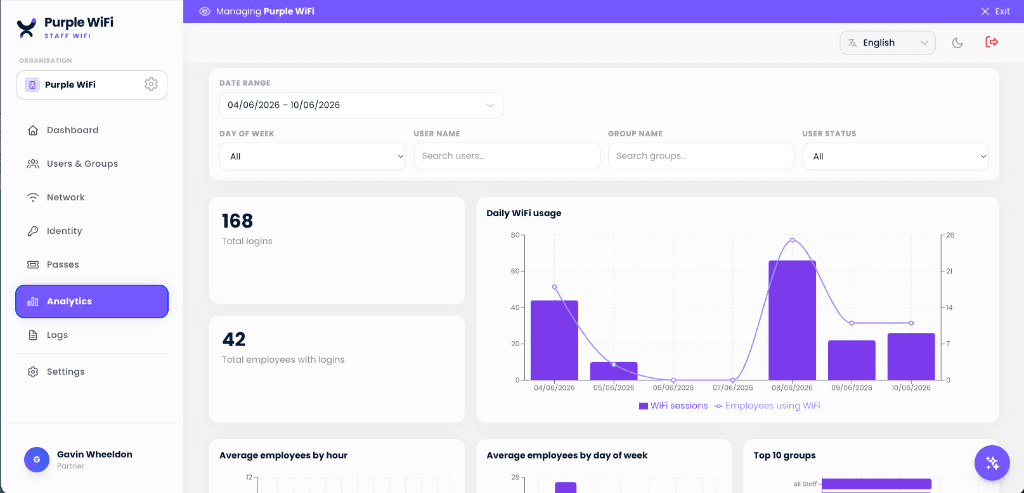
Logins, employees with logins, and usage over time across the whole estate. Because authentication runs in cloud RADIUS rather than on per-site hardware, a multi-site estate has one log to query.
- Live user directorySee who can reach the network right now, and disable a single user or device without touching anyone else.
- Filter by site, group or SSIDOne query across the whole estate, rather than one export per building to reconcile afterwards.
- Accepts and rejects togetherEvery outcome logged with its reason, so a support question and a security question are answered from the same view.

Ask a scoped question in plain English
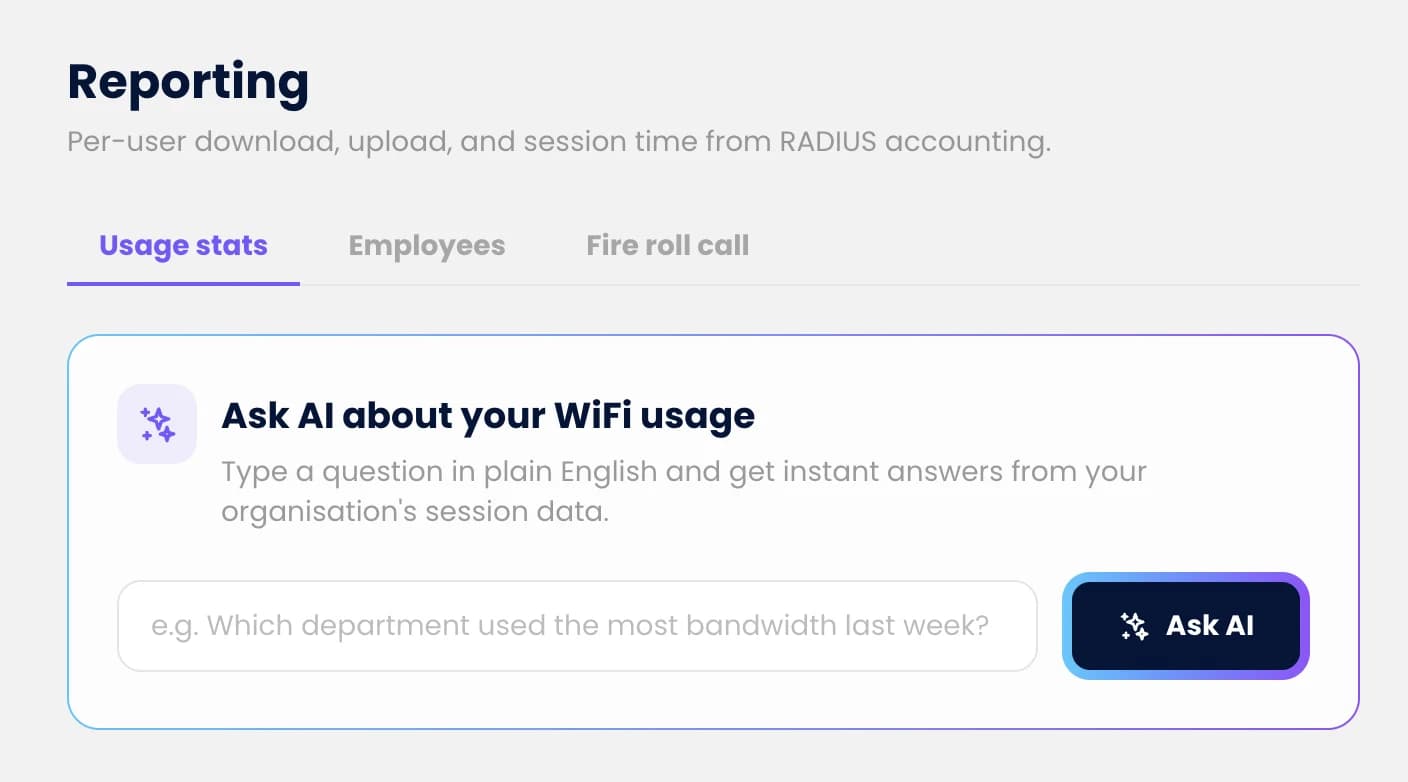
Audit requests rarely match a saved report. Ask AI answers questions about your own session data as a sentence, so a one-off request does not become a data-export ticket.
- Ask in a sentenceWhich users failed authentication at one site last week, which devices are unmanaged, when a named account last connected.
- Answers from your own sessionsGenerated from your network data, so the figures reconcile with what the log actually holds.
- No export ticketA one-off audit request stops being a CSV pull and a pivot table someone has to build by hand.
Which standards this evidence supports
No product can make your organisation compliant, and Purple does not claim to. What it does is keep the records an auditor asks to see. They are written automatically every time someone connects, rather than pulled together by hand before an assessment.
| Standard | Control | What the log provides |
|---|---|---|
| ISO 27001:2022 | A.5.15, A.5.18 access control and rights. A.8.15, A.8.16 logging and monitoring | Per-user access records drawn from directory membership, the timestamp at which access was granted, changed or removed, and an authentication log per user, device and site. |
| Cyber Essentials | User access control | Evidence that network access is provisioned to named people and removed when they leave, rather than governed by a key that circulates. |
| PCI DSS v4.0 | Requirement 8 identify and authenticate, Requirement 10 log and monitor | Unique per-user credentials in place of a shared key, and a record of access to the network the cardholder data environment sits behind. |
| HIPAA Security Rule | §164.312(b) audit controls, §164.308(a)(3) workforce security | A record of network activity by workforce member, and evidence that access was terminated when employment ended. |
| UK GDPR | Article 32 security of processing | Demonstrable access control over the network carrying personal data, and the audit trail that makes the control reviewable. |
Control numbers refer to each named standard. Whether this evidence satisfies your own scope is your assessor's decision, not ours.
The same data shows which offices are actually used
Every staff session records the site and the access point it connected through. That makes the log an occupancy record as well as an access record: you can see which buildings and floors are busy, on which days, without asking anyone to fill in a desk survey. Customers have used it to identify and reclaim up to 35% of unused office space.
- Which sites are busy, and whenAverage employees by hour and by day of week, per site, so a half-empty floor shows up as a figure rather than a hunch.
- Hybrid attendance, measuredSee which days people actually come in. Attendance policy and attendance reality are rarely the same number.
- Evidence for a lease decisionTake real utilisation into a renewal or a consolidation, instead of estimating from badge data or a one-week manual count.
Staff WiFi analytics questions
What do Purple's Staff WiFi analytics record?
Purple logs every 802.1X authentication on your staff network with the directory identity that authenticated, the device and its MDM enrolment state, the access point, SSID and site, the policy RADIUS returned, and whether the request was accepted or rejected. Because each employee holds their own certificate or credential, every session is attributable to a named person.
How long is staff WiFi authentication data kept?
Retention is configured per account, and the log can be streamed continuously to your own SIEM - Microsoft Sentinel, Splunk, Elastic or Datadog - so your retention policy governs how long the evidence is held rather than ours. Teams with a fixed audit window normally keep a working period in Purple and the long tail in the SIEM they already pay for.
Can I prove a leaver lost WiFi access on their last day?
Yes, and this is the question the log is best at. Because access is tied to the directory account rather than a shared password, offboarding in Microsoft Entra ID, Okta or Google Workspace removes WiFi access over SCIM at the same moment email is revoked. The deprovisioning event carries a timestamp, and any authentication attempt afterwards is logged as a reject - which is positive evidence that revocation took effect, not just an assertion that a password was changed.
Does this replace our SIEM?
No. Purple is the source of the WiFi authentication events and the reporting layer over them; the SIEM remains where you correlate those events with everything else and where long-term retention lives. Purple feeds the WiFi authentication events into Sentinel, Splunk, Elastic or Datadog so a failed-authentication spike sits alongside your other telemetry.
Is this the same thing as guest WiFi analytics?
No, and the difference matters for data protection. Guest WiFi analytics measures visitor behaviour in aggregate - footfall, dwell time, repeat visits - from anonymised device signals. Staff WiFi analytics records named authentications by employees for accountability and audit. Different data, different purpose, different lawful basis. If you are looking for venue footfall rather than employee access records, /guest-wifi/analytics is the page you want.
Do we need extra hardware to get this reporting?
No. The records are produced by the authentication itself, which runs through Purple cloud RADIUS on the enterprise access points you already own - Cisco Meraki, HPE Aruba, Ruckus, Juniper Mist, Ubiquiti UniFi, Cambium, Extreme and Fortinet. There is no on-premise RADIUS server to install and no logging appliance to size.
Can I see who is on the network right now?
Yes. A live view shows current sessions by user, device and site, and a single user or device can be disabled from the same screen without disrupting anyone else. That is the difference between a shared password, where the only remedy is rotating a key for everyone, and per-user credentials.
Does the same data tell us anything about how our offices are used?
It does, as a secondary use. Because staff sessions record the site and access point, the same log shows which buildings and floors are actually occupied and when, which is how customers have identified and reclaimed up to 35% of unused office space. The reporting is designed around access evidence first; occupancy is what falls out of it.
The short version
- Every authentication is recorded against a named directory identity, not a shared password, so per-user accountability comes from the network itself rather than from an access spreadsheet maintained by hand.
- Access-rights evidence is a by-product of running WiFi through your identity provider: Purple reads group membership from Microsoft Entra ID, Okta or Google Workspace over SCIM, so "who had access to this site on this date" is a query rather than an investigation.
- The log streams to Microsoft Sentinel, Splunk, Elastic or Datadog, so staff WiFi evidence sits with the rest of your security telemetry and your retention policy governs how long it is kept.
- Ask AI answers questions about session data in plain English, which turns a scoped audit request into a question instead of a CSV export and a pivot table.
Dernière révision :
Explore the complete WiFi guides
Enterprise WiFi security and authentication
The pillar guide behind this page: 802.1X, EAP-TLS, cloud RADIUS, identity-provider integration, and the standards each one answers to.
Staff WiFi
The product these records come from: passwordless staff WiFi with per-user 802.1X, identity-provider integration, and instant revocation.
The staff WiFi lifecycle
Joiner to leaver, stage by stage. Where the provisioning and deprovisioning events in the audit trail actually come from.
RADIUS-as-a-Service
The cloud RADIUS engine that authenticates every join request and writes the accept or reject the log is built on.
Guest WiFi analytics
The other half of the estate: footfall, dwell time and repeat visits from anonymised visitor data. Different data, different purpose.
Bring us your next audit question
Tell us what your assessor asked for last time. We will show you the query that answers it, running against staff WiFi data on your own access points.