
高密度企業網路的最佳 5GHz 頻道
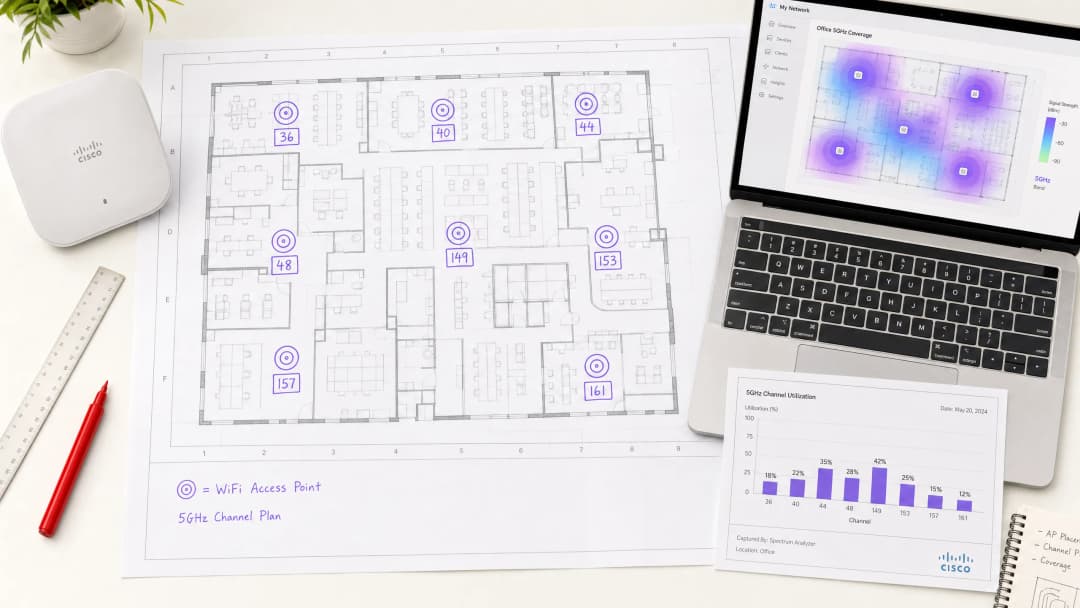
本指南為在高密度企業環境中選擇最佳 5GHz 頻道提供權威的技術參考,內容涵蓋 UNII 頻段架構、DFS 頻道風險管理以及頻譜分析方法。本指南專為在飯店、零售物業、體育場館、會議中心和公共部門校園部署企業 WiFi 的網路架構師和 IT 決策者編寫。書中包含實用的實施指南、真實案例研究和投資報酬率(ROI)框架,以支援本季度的部署決策。
收聽此指南
查看播客逐字稿
核心系列的一部分:Guest WiFi Guide →
執行摘要
5GHz 頻段中的頻道選擇並非只是一個設定細節,而是一個直接決定任何高密度部署中吞吐量、可靠性與用戶端容量的根本性架構決策。對於每層樓需要支援數百台同時連線裝置的企業環境,精心規劃的頻道策略與預設的自動頻道設定之間的差異,可能就是低於 50 毫秒延遲與網路在負載下癱瘓之間的差別。
5GHz 頻譜在 UNII-1、UNII-2 和 UNII-3 頻段中提供多達 25 個互不重疊的 20MHz 頻道。然而,並非所有頻道都是相同的。UNII-1(頻道 36–48)和 UNII-3(頻道 149–165)為非 DFS 頻道,應作為任何企業頻道規劃的骨幹。UNII-2 頻道(52–144)則引入了動態頻率選擇(DFS)義務,這在鄰近雷達的環境中會帶來營運風險。
本指南將深入探討 5GHz 頻譜的技術架構,提供結構化的頻道規劃方法,並呈現來自旅宿業、醫療照護機構和大型場域部署的實際案例研究。對於已經大規模營運 Guest WiFi 基礎架構的團隊,此處概述的頻道策略可直接與透過 WiFi Analytics 進行的數據分析驅動容量規劃整合。
技術深度探討
5GHz 頻譜架構

5GHz 頻段被細分為無授權國家資訊基礎設施(UNII)子頻段,每個子頻段具有不同的法規特性。對於企業架構師而言,理解這些區別是不可妥協的。
| 頻段 | 頻道 | 頻率範圍 | 需要 DFS | 最大 EIRP (歐盟) | 建議用途 |
|---|---|---|---|---|---|
| UNII-1 | 36, 40, 44, 48 | 5.180–5.240 GHz | 否 | 200 mW | 關鍵任務 SSID |
| UNII-2A | 52, 56, 60, 64 | 5.260–5.320 GHz | 是 | 200 mW | 補充容量 |
| UNII-2C | 100–144 | 5.500–5.720 GHz | 是 | 1000 mW | 僅限高功率回傳 |
| UNII-3 | 149, 153, 157, 161, 165 | 5.745–5.825 GHz | 否 (多數地區) | 200 mW | 關鍵任務 SSID |
注意:UNII-3 的 DFS 要求因管轄區而異。在英國和歐盟,頻道 149–165 為非 DFS。在部署前,請先確認當地 OFCOM 或國家監管機構的要求。
為什麼頻道寬度是最常被誤解的變數
為了追求最大理論吞吐量而配置 80MHz 或 160MHz 頻道寬度,這種直覺是可以理解的,但在密集部署中往往適得其反。一個 80MHz 頻道會消耗相當於四個 20MHz 頻道的頻譜。在擁有 40 個基地台的場地中,這會大幅減少可用的頻道池,迫使同頻道干擾發生,進而降低整體網路效能,其代價遠超過單一用戶端吞吐量提升所帶來的效益。
對於高密度環境,20MHz 頻道是正確的預設值。透過啟用更多同時發生的空間重用,可以最大化整個場地的總吞吐量,而不是為每個用戶端提供更寬的管道。在董事會會議室或私人辦公室等中等密度區域,40MHz 頻道可能是合適的。80MHz 和 160MHz 則應保留給專用的高吞吐量應用,例如無線回程網路,或是在低用戶端數量的隔離區域進行影音傳輸。
DFS:廠商低估的營運風險
動態頻率選擇 (DFS) 是一種 IEEE 802.11h 機制,要求基地台監測雷達訊號,並在偵測到雷達後的 60 秒內撤離該頻道。強制性的頻道可用性檢查 (CAC) 期間(在某些頻道上長達 60 秒)意味著基地台在確認該頻道沒有雷達干擾之前,無法在該 DFS 頻道上進行傳送。在故障轉移或重新啟動的情況下,這會導致服務中斷。
這對企業部署的實際影響非常顯著。機場、港口、軍事設施和氣象監測站都運行著可能觸發 DFS 事件的雷達系統。即使在城市環境中,也會發生非預期的 DFS 事件。一個在沒有備用方案的情況下嚴重依賴 UNII-2 頻道的網路,將會經歷週期性、不可預測的用戶端斷線,這不僅難以診斷,也讓終端用戶感到沮喪。
特別是對於 餐飲旅宿 部署而言,顧客滿意度與網路可靠性直接掛鉤,在入住尖峰時段或會議期間因 DFS 觸發的中斷會造成商業損失。同樣的原則也適用於 零售 環境,其收銀系統和庫存管理工具都依賴不間斷的連線。
如需更廣泛地瞭解頻段特性,請參閱 WiFi 頻率:2026 年 WiFi 頻率指南。
最佳 5GHz 頻道:明確排名
對於企業部署,建議的頻道優先順序如下:
第一級 - 務必使用(非 DFS、通用相容性)
- 頻道 36, 40, 44, 48 (UNII-1)
- 頻道 149, 153, 157, 161 (UNII-3)
這八個頻道構成了任何企業級頻道規劃的基礎。它們屬於非 DFS,受用戶端裝置的通用支援,且在所有主要法規管轄區皆可使用。對於每層樓部署不超過八台 AP 的環境,僅使用 Tier 1 頻道即可實現乾淨的「一台 AP 分配一個頻道」規劃。
Tier 2 — 搭配監控使用(DFS,雷達干擾風險較低)
- 頻道 52, 56, 60, 64 (UNII-2A)
這些頻道帶有 DFS 義務,但屬於較低的 UNII-2 範圍,其雷達干擾通常少於 UNII-2C。當 Tier 1 頻道已用盡,且經評估雷達臨近度較低時,這些頻道適合用於提供補充容量。
Tier 3 — 謹慎使用(DFS,雷達干擾風險較高,高功率)
- 頻道 100–144 (UNII-2C)
雖然 UNII-2C 頻道在某些地區提供較高的允許發射功率,但它們帶有最高的雷達干擾風險。請將這些頻道保留用於專屬的骨幹傳輸(Backhaul)鏈路,或已透過徹底的頻譜勘測確認雷達活動極少的環境。
發射功率與蜂巢大小
頻道規劃與發射功率管理密不可分。功率過高的存取點會產生大型蜂巢,從而增加同頻道干擾。在高密度部署中,目標蜂巢大小應小且保持一致。發射功率應設定在能為預定區域提供足夠覆蓋範圍的最低水平,在密集室內環境中,服務用戶端的無線電晶片通常介於 8 - 14 dBm 之間。
當限制在定義的功率範圍內時,自動功率控制機制(例如 Cisco 的 TPC 或 Aruba 的 ARM)會非常有效。允許這些系統在沒有限制的情況下運作,往往會導致高功率配置,進而破壞頻道重複使用規劃。
對於您的特定設置有任何疑問嗎?
我們的團隊與超過 80,000 個場域的場域營運商、IT 經理和網路工程師合作。立即預約 20 分鐘的通話,我們將向您展示其他與您相似的用戶是如何解決此問題的。
實作指南
步驟 1:部署前頻譜勘測
在放置任何一台存取點之前,請對整個場地進行被動頻譜勘測。其目標是識別現有的射頻來源 - 鄰近網路、舊版設備、微波干擾以及任何雷達活動。Ekahau Sidekick、AirMagnet Survey Pro 或企業級控制器內建的頻譜分析功能(Cisco CleanAir、Aruba AirMatch)等工具可提供必要的能見度。
將勘測結果記錄在頻道利用率圖中。識別哪些頻道已因相鄰部署而擁擠,哪些頻道是乾淨的。這些數據將直接為您的頻道分配計劃提供依據。
步驟 2:定義您的頻道規劃
根據頻譜勘測,按照以下原則為存取點分配頻道:
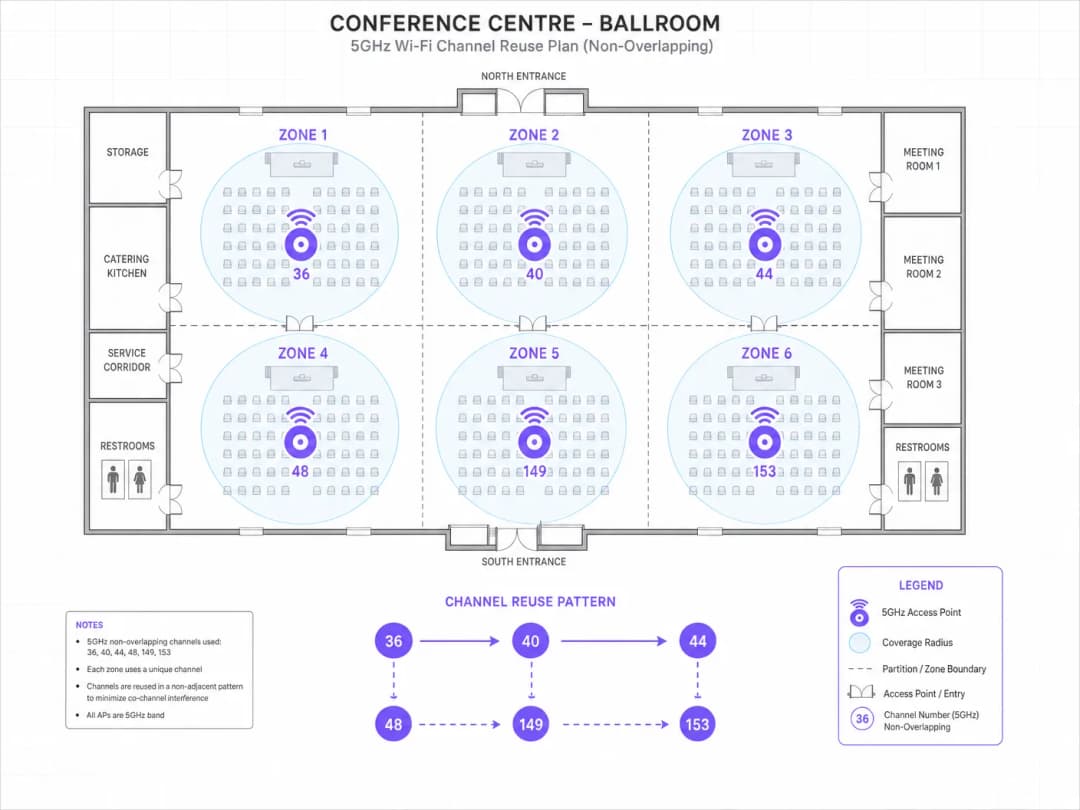
- 相鄰的 AP 絕不能共用相同的頻道。
- 位於相同頻道上的 AP 應至少間隔兩個蜂巢直徑,以盡可能減少同頻道干擾。
- 在引入第 2 層或第 3 層頻道之前,請先使用完整的第 1 層頻道集。
- 對於多樓層部署,請考量垂直同頻道干擾。正上方或正下方的 AP 應使用不同的頻道。
對於擁有 8 個 AP 的 10,000 平方英尺樓層,使用頻道 36、40、44、48、149、153、157、161 可以實現乾淨的分配,且在同一樓層上無需重複使用頻道。對於需要 8 個以上 AP 的更大樓層,請在確認雷達風險較低後引入第 2 層頻道。
步驟 3:配置頻道寬度
將所有提供用戶端服務的無線電預設設定為 20MHz 頻道寬度。如果特定高吞吐量區域(例如有視訊會議需求的會議室)需要 40MHz,請將其配置為例外情況,並在網路設計記錄中記錄明確的理由。
步驟 4:停用關鍵基礎架構上的自動頻道功能
對於為關鍵任務應用程式(POS 系統、VoIP、醫療裝置)提供服務的 AP,請停用自動頻道選擇並靜態分配頻道。自動頻道演算法雖然對一般部署有用,但在複雜的 RF 環境中可能會做出次優決策,並在營業時間內引入非預期的頻道變更。
步驟 5:配置頻段導引與用戶端負載平衡
確保啟用頻段導引以將支援的用戶端推向 5GHz。在 Wi-Fi 6(802.11ax)部署中,OFDMA 和 BSS 著色技術提供了減少同頻道干擾的其他機制,但這些是完善頻道規劃的補充 - 而非替代方案。
如需在共享環境中跨多個 SSID 進行流量分割的指引,請參閱 共享 WiFi 網路的微分割最佳實作。
步驟 6:部署後驗證
部署後,執行主動勘測以驗證覆蓋範圍、訊號強度和頻道利用率。要確認的關鍵指標:
- 用戶端裝置的 RSSI:在單元邊緣目標為 -65 dBm 或更好。
- 同頻道干擾(CCI):來自同頻道鄰居的目標低於 -85 dBm。
- 頻道利用率:在尖峰負載期間,任何單一頻道上的目標低於 50%。
- 漫遊效能:驗證 802.11r(快速 BSS 轉換)和 802.11k(鄰近報告)功能是否正常運作。
最佳實作
以下建議代表了與 IEEE 802.11 標準以及來自 Wi-Fi 聯盟和 CWNP 等機構的 WLAN 業界指引一致的廠商中立最佳實作。
針對所有高密度部署標準化採用 20MHz 頻道。 在每個 AP 有超過 20 個並行用戶端的環境中,重複使用頻道帶來的總容量優勢始終優於更寬頻道帶來的單一用戶端吞吐量提升。
維護一份頻道規劃文件。 每個 AP 都應該有記錄在案的頻道分配、功率電平和理由。這對於疑難排解以及在韌體升級或硬體更換過程中保持一致性至關重要。
針對企業 SSID,實施採用 802.1X 驗證的 WPA3-Enterprise。在處理付款卡資料的環境中,PCI-DSS 4.0 要求強大的驗證與加密。採用 CNSA 套件加密技術的 WPA3 符合這些要求,並提供 WPA2 無法保證的前向安全性。
持續監控 DFS 事件。 針對在 DFS 頻道上運作的任何 AP,在運作的第一個月內,應每週審查其 DFS 事件記錄。每週發生兩次以上 DFS 事件的頻道,應從自動頻道選取池中列入黑名單。
符合 guest 網路的 GDPR 要求。 在 hospitality 與 retail 環境中,guest WiFi 資料收集必須符合 GDPR 規範。Purple 的 Guest WiFi 平台提供內建的同意管理與資料治理工具,可與本指南中描述的網路基礎架構整合。
有關辦公室特定 WiFi 最佳化考量,請參閱 Office Wi-Fi: Optimise Your Modern Office Wi-Fi Network。
疑難排解與風險緩釋
同頻干擾 (CCI)
CCI 是企業 WiFi 部署中最常見的效能降低因素。症狀包括高重試率、吞吐量降低以及漫遊效能不佳。診斷需要頻譜分析儀或基於控制器的射頻 (RF) 分析。解決方案包括調整頻道分配以增加同頻 AP 之間的隔離度,以及降低傳輸功率以縮小單元覆蓋範圍。
DFS 觸發的頻道變更
如果用戶端遇到持續 30 至 60 秒的定期斷線,DFS 事件很可能是原因。請檢查 AP 事件記錄中是否有 DFS 雷達偵測條目。解決方案:將受影響的頻道自自動頻道選取池中列入黑名單,並分配替代的第 1 級頻道。在 DFS 事件頻繁的環境中,請考慮完全遷移至非 DFS 頻道。
隱藏節點問題
在倉庫或展覽廳等大型開放式環境中,隱藏節點問題 (兩個用戶端無法互相偵測,但都試圖向同一個 AP 傳輸) 會導致衝突率上升。緩釋措施包括啟用 RTS/CTS 閾值,並確保 AP 配置能提供足夠的覆蓋重疊。
舊版用戶端相容性
舊版 802.11a 裝置僅在 UNII-1 頻道上運作。如果您的環境包含舊版裝置,請確保 UNII-1 頻道保持可用,且為舊版用戶端服務的 SSID 已啟用較低的強制資料傳輸率。避免在同一個 SSID 上將舊版用戶端與現代 802.11ac 或 Wi-Fi 6 用戶端混合使用,因為舊版管理框架會降低整體網路效率。
對於在 WiFi 之外同時整合低功耗藍牙的環境 (常見於 retail 與 healthcare 部署) - 請參閱 BLE Low Energy Explained for Enterprise 了解共存指引。
惡意 AP 偵測
在高密度環境中,與您的基礎架構運作於相同頻道的惡意存取點(rogue AP)會造成無法管理的干擾。請實施 WIDS/WIPS(無線入侵偵測/防禦)以偵測並遏制惡意 AP。大多數企業級控制器都原生包含此功能。
投資報酬率與商業影響
量化不良頻道規劃的成本
頻道設定不佳對業務帶來的影響是可衡量的。在一家擁有 200 間客房的飯店中,如果網路因同頻道干擾而面臨 15% 的封包重試率,則在負載下,每個 AP 的平均吞吐量約為 40 - 50 Mbps,而經過妥善規劃頻道策略的網路則可達到 150+ Mbps。對於依賴網路進行視訊串流、視訊會議和雲端工作的人員來說,這種差異是立即可察覺的,並會直接影響滿意度評分。
在 零售 環境中,影響 POS 系統的網路不穩定會直接產生營收影響。在交易尖峰時段,單一 POS 終端機若有 10 分鐘無法處理交易,會使典型的高街零售商損失 200 - 500 英鎊的銷售額,具體取決於吞吐量。在多據點的企業資產中,WiFi 可靠性不佳的累計成本是非常顯著的。
衡量成功指標
執行良好的頻道計劃之關鍵效能指標包括:
| KPI | 基準(配置不良) | 目標(已最佳化) |
|---|---|---|
| 平均用戶端吞吐量 | 20 - 40 Mbps | 100 - 200 Mbps |
| 封包重試率 | 15 - 25% | < 5% |
| 漫遊延遲 | 200 - 500 ms | < 50 ms(使用 802.11r) |
| 每週 DFS 事件次數 | 5 - 20 | 0(非 DFS 頻道) |
| 用户端關聯失敗率 | 3 - 8% | < 1% |
與分析驅動的容量規劃整合
頻道規劃並非一次性的工作。隨著裝置密度、使用模式和鄰近 RF 環境的演變,頻道計劃必須定期審查和更新。Purple 的 WiFi Analytics 平台提供實時的用戶端密度、停留時間和區域網路使用率的可視性,這些數據能直接為持續的頻道計劃最佳化提供資訊。
對於裝置密度隨時間變化而劇烈波動的 交通 樞紐和 醫療保健 園區,分析驅動的動態頻道管理提供了維持一致效能所需的營運智慧,無需人工干預。
本指南由 Purple 技術內容團隊維護。如需部署支援或討論您的特定部署需求,請透過 purple.ai 聯絡 Purple。
關鍵定義
UNII 頻段
Unlicensed National Information Infrastructure(免授權國家資訊基礎設施) - 將 5GHz 頻譜劃分為多個子頻段(UNII-1, UNII-2A, UNII-2C, UNII-3)的監管框架,每個子頻段都有不同的功率限制和 DFS 要求。UNII 命名決定了哪些頻道在沒有雷達共存義務的情況下可用。
IT 小組在審查 5GHz 部署的法規遵循性時會遇到這種情況,特別是在跨多個具有不同頻譜法規的國家/地區進行營運時。
DFS (Dynamic Frequency Selection)
一種 IEEE 802.11h 機制,要求存取點監控 UNII-2 頻道上的雷達訊號,並避開任何偵測到雷達的頻道。強制性的頻道可用性檢查(CAC)時間可能長達 60 秒,在此期間 AP 無法進行傳輸。
對於使用 52 至 144 頻道的任何部署都至關重要。DFS 事件會導致用戶端中斷連線,並且是機場、港口或氣象站附近環境中 WiFi 間歇性故障的常見根本原因。
同頻道干擾 (CCI)
當兩個或多個存取點在彼此的訊號範圍內,並在同一個頻道上運作時發生的干擾。與鄰頻道干擾不同,同頻道干擾(CCI)會導致 AP 延遲傳輸(CSMA/CA),直接降低總體吞吐量並增加延遲。
高密度 WiFi 部署中導致效能下降的主要因素。透過頻譜分析或顯示高重試率和低頻道利用效率的控制器 RF 報告進行診斷。
頻道重複使用
將相同頻道分配給多個存取點的實踐方式,這些存取點之間保持足夠的距離以避免同頻道干擾。有效的頻道複用透過允許在非重疊的覆蓋區域內同時以相同頻率進行傳輸,從而最大化網路的總容量。
高密度 WiFi 設計背後的核心原則。透過使用 20MHz 頻道和控制資料夾大小來最大化頻道重複使用,始終能比最大化單一用戶端吞吐量提供更好的總體效能。
BSS 著色技術 (BSS Colouring)
一項 IEEE 802.11ax (WiFi 6) 功能,為每個基本服務集分配一個顏色識別碼,使 AP 能夠區分來自其自身 BSS 的傳輸與來自重疊 BSS 的傳輸。這減少了在多個 BSS 重疊的高密度環境中不必要的延遲。
適用於 WiFi 6 與 WiFi 6E 硬體。可減少高密度部署中同頻道干擾的影響,但並不能免除制定合理頻道規劃的需求。
OFDMA (正交分頻多重進接)
IEEE 802.11ax 中引入的多用戶存取技術,將頻道分割為更小的資源單元 (RU),允許 AP 在單次傳輸機會內同時為多個用戶端提供服務。顯著提高了擁有大量小封包用戶端之高密度環境中的效率。
適用於高用戶端密度與混合流量類型 (IoT、行動裝置、筆記型電腦) 環境中的 WiFi 6 部署。OFDMA 輔助但無法取代頻道規劃。
TPC (傳輸功率控制)
一種 IEEE 802.11h 機制,允許存取點根據射頻環境動態調整傳輸功率。在企業級部署中,TPC 用於縮小細胞覆蓋範圍並最大程度地減少同頻道干擾,這在高密度配置中尤為重要。
在企業級部署中,應配置明確的最小和最大功率限制。不受限制的 TPC 可能會導致高功率配置,從而破壞頻道複用規劃。
802.11r (快速 BSS 轉換)
一項 IEEE 修正案,透過在用戶端開始漫遊之前向鄰近存取點進行預先驗證,以降低漫遊延遲。將漫遊時間從 200 - 500 毫秒 (標準 802.11) 縮短至 50 毫秒以下,這對語音和視訊應用程式至關重要。
對於任何支援 VoIP、視訊會議或用戶端在 AP 之間漫遊的即時應用程式的部署至關重要。必須與 802.11k (鄰近報告) 和 802.11v (BSS 轉換管理) 一同啟用,以獲得最佳漫遊效能。
頻譜分析
跨頻段測量射頻環境以識別訊號源、干擾和頻道利用率的過程。被動頻譜分析 (僅接收) 在部署前進行;主動分析在部署後進行以驗證效能。
任何企業級 WiFi 部署的強制性步驟。如果沒有頻譜勘測,頻道分配將基於可能無法反映實際射頻環境的假設,從而導致部署後難以診斷的干擾問題。
範例
一家擁有 350 間客房的市中心飯店正在 12 個樓層部署 WiFi 6 基地台(AP),每層約有 30 個 AP。該飯店經常在可容納 1,200 人的宴會廳舉辦企業活動。IT 總監報告指出,先前的網路在大型活動期間經常出現持續性連線問題,賓客抱怨速度慢且頻繁斷線。頻道規劃應如何建構?
首先在所有 12 個樓層和宴會廳進行全面的被動頻譜勘測,特別注意從建築物周邊可見的鄰近飯店和辦公大樓的 WiFi 網路。鑑於其市中心位置,假設存在來自相鄰部署的嚴重 RF 干擾。
針對客房樓層:每層有 30 個 AP,將需要重複使用 8 個 第 1 級非 DFS 頻道(36、40、44、48、149、153、157、161)。以最大化同頻道 AP 之間物理距離的模式分配頻道 - 通常是角對角重複使用模式。將所有無線電設定為 20MHz 頻道寬度。將發射功率設定為 10 - 12 dBm,以建立小型、受限的小區,從而最大程度地減少來自上下樓層的同頻道干擾。
針對宴會廳:部署高密度 AP(例如 Cisco Catalyst 9130AXE 或 Aruba AP-575),安裝在天花板高度,並使用指向性天線向下照射。為每個 AP 分配不重複的頻道 - 宴會廳內不重複使用頻道。停用宴會廳 AP 上的 2.4GHz 以消除 2.4GHz 干擾。配置一個專用的活動 SSID,並啟用用戶端隔離與限制每位用戶端的頻寬,以確保公平分配。啟用 802.11r 以便在 AP 之間進行快速漫遊。
針對企業 SSID:配置 WPA3-Enterprise 與 802.1X 驗證。為服務商務中心和會議室的 AP 分配靜態頻道。鑑於市中心位置和不可預測的雷達環境,請完全停用 DFS 頻道。
部署後:在擁有 200 多個已連線裝置的測試活動期間,透過主動勘測進行驗證。目標重試率低於 5%,且平均用戶端傳輸量高於 80 Mbps。
一家擁有 180 家門市的連鎖零售商在約 15% 的門市遇到間歇性 POS 系統故障。這些故障與一天中的時間或交易量無關。網路記錄顯示定期發生 AP 重啟和頻道變更。該連鎖店混用 3 - 5 年前部署的 Aruba 和 Cisco AP,且所有站點均啟用了自動頻道。您會如何診斷並解決此問題?
這種症狀特徵 - 在部分位置發生間歇性故障,且與負載無關,並伴隨著頻道變更 - 是教科書般的 DFS 事件特徵。第一步是從受影響的站點提取 DFS 事件日誌。在 Aruba 環境中,這可以透過 AirWave 或 Central 取得;在 Cisco 環境中,則可透過 Prime Infrastructure 或 DNA Center 取得。
針對每個受影響的站點,識別哪些頻道正在經歷 DFS 事件以及這些事件的發生頻率。使用 Ofcom 的 Sitefinder 資料庫或同等的國家登記冊,交叉比對站點位置與機場、港口和氣象雷達設施的鄰近程度。
對於確認有 DFS 事件的站點:立即將受影響的頻道從自動頻道池中加入黑名單。將自動頻道僅限制在 UNII-1 和 UNII-3 頻道(36, 40, 44, 48, 149, 153, 157, 161)。特別是對於提供 POS 服務的 AP,應完全停用自動頻道並分配靜態的第一級(Tier 1)頻道。
對於其餘 85% 沒有 DFS 事件的站點:主動將自動頻道限制在第一級頻道,以作為預防措施。DFS 頻道所帶來的邊際容量效益,並不足以讓 POS 基礎設施承擔其營運風險。
透過集中式控制器管理平台,以分階段的方式發佈設定變更:先在 20 個站點進行試點,驗證兩週,然後部署到整個園區。在網路管理系統中記錄每個站點的頻道計劃。
練習題
Q1. 您是一家可容納 15,000 人的室內體育館的網路架構師。該場地每年舉辦 80 場活動,WiFi 連線並行尖峰期約為 8,000 台設備。該場地距離區域機場 4 公里。您已獲得 120 個存取點的預算。請為 5GHz 無線電配置設計頻道規劃。
提示:請考慮與機場的鄰近程度及其對 DFS 頻道可用性的影響。思考分佈在單個大型空間中的 120 個 AP 如何影響頻道複用需求。哪種頻道寬度能為 8,000 個並行用戶端最大化總容量?
查看標準答案
鑑於距離區域機場僅 4 公里,DFS 頻道會帶來不可接受的營運風險 - 雷達偵測事件會導致 AP 在現場活動期間變更頻道,從而同時為數千名使用者造成明顯的連線中斷。頻道規劃必須僅限於 Tier 1 非 DFS 頻道:36、40、44、48、149、153、157、161。
擁有 120 個 AP 和 8 個可用頻道,平均頻道重用因子為 15(每個頻道約由 15 個 AP 使用)。為了在該重用因子下最大程度地減少同頻道干擾,所有無線電必須設置為 20MHz 頻道寬度,並且必須嚴格控制發射功率 - 針對觀眾席區的 AP,目標設為 8 - 10 dBm 以建立小型、封閉的單元。
AP 的部署應在觀眾席區採用網格模式,將 AP 安裝在座椅排下方(座椅下 AP 部署)或每隔 3 - 4 排安裝在支柱上,並朝下照射。這可以最大程度地減少覆蓋半徑,並減少任何給定用戶端範圍內的同頻道 AP 數量。
對於密度較低的大廳區域,UNII-1 上的 40MHz 頻道是可以接受的。為員工/營運部署一個獨立的 SSID,並在 UNII-3 頻道上進行靜態頻道分配。
部署後,在首場現場活動之前,使用 200 多個測試裝置進行全面的主動量測,以驗證重試率和吞吐量。
Q2. 某醫療機構正在一間擁有 400 張病床的醫院中部署新的 WiFi 網路。該網路必須支援臨床應用程式,包括電子病歷(EPR)、VoIP 手持裝置、輸液幫浦遙測和護理師呼叫系統。該機構的資訊安全團隊已要求付款亭必須符合 PCI DSS 規範,且病人資料必須符合 GDPR 規範。關鍵的頻道規劃和安全設定決策有哪些?
提示:請考慮任務關鍵型臨床應用程式(對斷線零容忍)和安全分段要求的結合。醫療裝置的存在如何影響您的頻道寬度和 DFS 決策?
查看標準答案
臨床環境對網路中斷零容忍 - VoIP 手持裝置斷線或輸液幫浦失去遙測連線會直接影響病人安全。頻道規劃必須將可靠性置於容量之上。
所有臨床 AP 必須分配靜態 Tier 1 頻道(36、40、44、48、149、153、157、161)。必須完全停用 DFS 頻道 - 觸發 DFS 的頻道變更進而中斷臨床應用程式的風險是不可接受的。在為臨床區域提供服務的所有 AP 上,必須停用自動頻道選擇。
針對 VoIP 手持裝置:在語音 SSID 上啟用 802.11r(快速 BSS 轉換)、802.11k(鄰近報告)和 802.11v(BSS 轉換管理)。目標漫遊延遲低於 50 毫秒。為語音分配專屬的 SSID,並設定 WMM QoS 以優先處理語音流量(AC_VO 佇列)。
針對安全分段:為臨床員工(WPA3-Enterprise、使用憑證驗證的 802.1X)、醫療裝置(視裝置支援而定,採用 WPA2-Enterprise 或 WPA3-Enterprise)、訪客/病人(WPA3-Personal 或帶有 Captive Portal 的開放式網路)以及付款亭(WPA3-Enterprise、用於 PCI DSS 合規的隔離 VLAN)部署獨立的 SSID。
針對 PCI DSS 4.0 合規性:付款亭 SSID 必須使用配備 CNSA 套件加密演算法的 WPA3-Enterprise,在隔離的 VLAN 上運作,且不允許橫向移動至臨床網路,並需接受每季的無線漏洞評估。
針對 GDPR:除了 WPA3 傳輸加密外,透過 WiFi 傳輸的病人資料必須在應用程式層進行加密(最低 TLS 1.3)。訪客 WiFi Captive Portal 必須在擷取資料前包含明確的同意收集流程。
Q3. 一家零售連鎖店的網路營運中心發現,在 200 家分店的店面中,有 23 家分店在交易尖峰時段(12:00 至 14:00 和 17:00 至 19:00)的用戶端吞吐量持續低於 20 Mbps。所有分店均使用相同的 AP 型號和韌體。控制器顯示受影響分店的頻道 36 和 149 的平均頻道利用率為 78%。其診斷與補救計劃為何?
提示:在可預測的時間範圍內,特定頻道上的高頻道利用率指向特定的干擾模式。請考慮這 23 家受影響的商店有何共同點,以及在營業高峰期發生了什麼變化。
查看標準答案
在交易尖峰時段,頻道 36 和 149 的頻道利用率達到 78%,這明顯是指標性的同頻干擾,由高用戶端密度所引起,且可能因鄰近零售 WiFi 網路在交易尖峰時段的流量同時達到頂峰而加劇。
診斷步驟:(1) 擷取受影響分店在尖峰時段的頻譜分析數據。確定頻道利用率是由分店自身的用戶端還是由鄰近網路所驅動。(2) 檢查 AP 傳輸功率設定 - 如果 AP 以最大功率運行,其蜂巢覆蓋範圍會變大並產生重疊,從而在分店自身的 AP 之間造成嚴重的同頻干擾。(3) 驗證頻道分配 - 如果僅使用頻道 36 和 149,則所有 AP 都在共享兩個頻道,這就是根本原因。
補救措施:(1) 擴充頻道計劃以使用所有八個 Tier 1 頻道(36、40、44、48、149、153、157、161)。將 AP 重新分配到所有八個頻道中。(2) 將傳輸功率降低至 10 - 12 dBm,以縮小蜂巢覆蓋範圍並減少同頻干擾。(3) 啟用頻段導向(band steering),以確保具備能力的用戶端連接至 5GHz。(4) 如果鄰近網路的干擾特別集中在頻道 36 和 149 上,請將這些 AP 重新分配到頻道 44 和 157,以避開擁擠的頻率。
預期結果:每個頻道的頻道利用率應降至 30 - 45%,且在尖峰時段的平均用戶端吞吐量應恢復至 80 - 120 Mbps。
繼續閱讀本系列
深入瞭解 RSSI 與訊號強度以實現最佳頻道規劃
本指南提供有關 RSSI、訊號雜訊比 (SNR) 及射頻 (RF) 傳播原理的全面技術深入剖析,以實現最佳頻道規劃。它為 IT 經理、網路架構師和場所營運總監提供實用策略,以減輕同頻道干擾與相鄰頻道干擾、最佳化 AP 部署,並利用分析工具在旅宿、零售和公共部門環境中產生可衡量的業務影響。
WiFi 6 對決 WiFi 5:它能解決通道干擾嗎?
本指南深入探討 WiFi 6 (802.11ax) 如何透過 OFDMA 與 BSS Coloring 技術,解決高密度企業環境中的通道干擾問題。它為 IT 經理、網路架構師和 CTO 提供了實用的部署策略、來自旅宿業與醫療業的真實案例研究,以及一個用於評估在無線網路效能至關重要的場所中進行基礎設施升級 ROI 的框架。
高密度場域的最佳 WiFi 頻道
為體育館、競技場和大型公共場所等高密度環境選擇和優化 WiFi 頻道的權威技術參考。內容涵蓋射頻(RF)物理學、5 GHz 與 6 GHz 頻段的頻道複用策略,以及為 IT 主管提供的實用部署指南。
對於您的特定設置有任何疑問嗎?
我們的團隊與超過 80,000 個場域的場域營運商、IT 經理和網路工程師合作。立即預約 20 分鐘的通話,我們將向您展示其他與您相似的用戶是如何解決此問題的。