
在行動裝置上實作 802.1X 驗證
本綜合指南為 IT 領導者提供了在 iOS 和 Android 裝置上實作 802.1X 驗證的技術藍圖。內容涵蓋架構、EAP 方法選擇、MDM 佈署以及故障排除,以確保安全、具擴充性的行動網路存取。
收聽此指南
查看播客逐字稿
核心系列的一部分:Enterprise WiFi Security Guide →
執行摘要
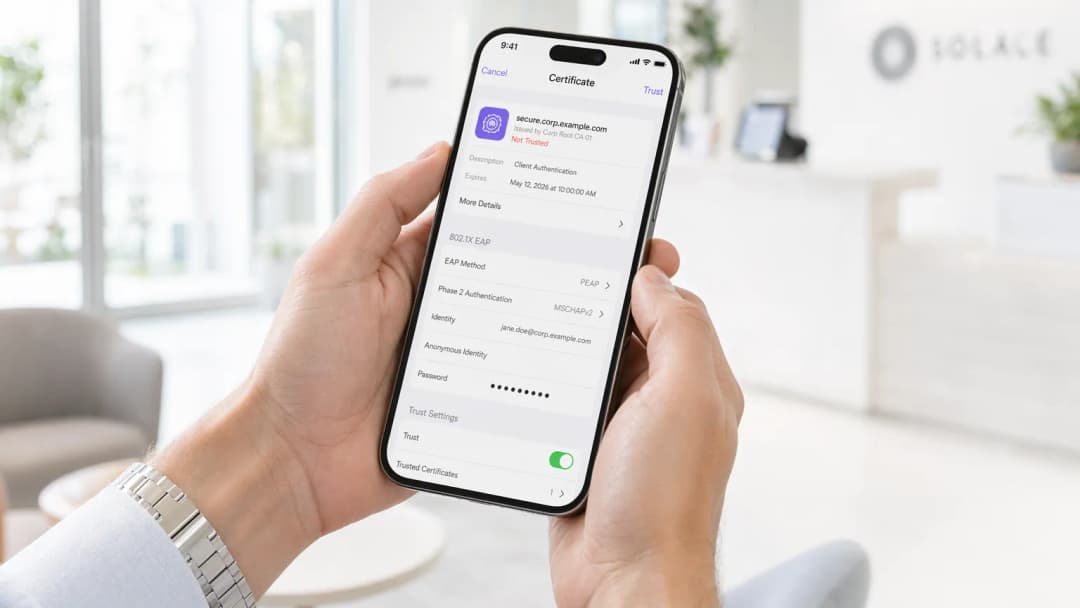
在行動裝置上實施 802.1X 驗證已成為企業環境的必備要求。不論是管理企業辦公室、500 間客房的飯店,還是體育場,依賴預先共用金鑰 (PSK) 都會帶來無法接受的安全風險。本指南提供在 iOS 與 Android 設備上部署 802.1X 的完整技術藍圖。我們將介紹架構需求、可延伸驗證協定 (EAP) 方法選擇、行動裝置管理 (MDM) 配置以及常見的失敗模式。
透過轉換到 802.1X,企業組織可以實現精細的網路存取控制、增強的 Guest WiFi 安全性,並符合 PCI-DSS 和 GDPR 等框架的規範。這項轉變需要無線基礎設施、RADIUS 伺服器與行動終端設備之間的精準協調。
技術深究:架構與 EAP 方法
IEEE 802.1X 標準定義了基於連接埠的網路存取控制,由三個主要元件組成:要求端 (supplicant) (行動裝置)、驗證端 (authenticator) (無線存取點或控制器) 以及驗證伺服器 (authentication server) (RADIUS)。
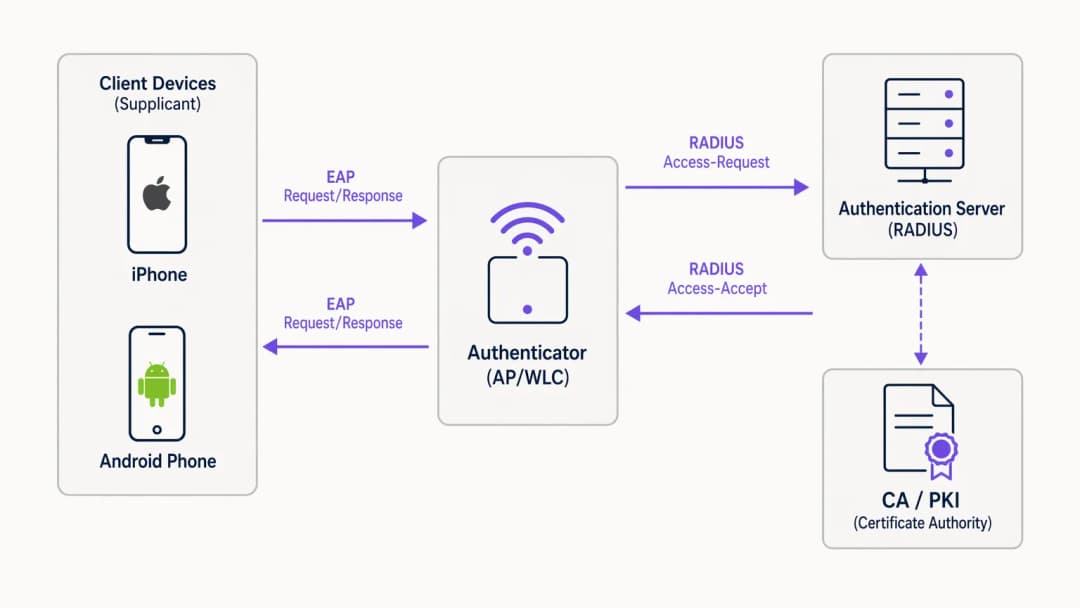
當行動裝置嘗試連線時,驗證端會阻擋除 EAPoL (EAP over LAN) 封包以外的所有流量,直到 RADIUS 伺服器成功驗證憑證。EAP 方法的選擇決定了安全狀況與部署的複雜度。
行動裝置的 EAP 方法選擇
行動作業系統對 EAP 方法的內建支援程度各有不同。企業部署中兩個最主要的標準是 EAP-TLS 與 PEAP-MSCHAPv2。

EAP-TLS 是最安全的防護方法,依賴基於憑證的雙向驗證。它消除了憑證被盜的風險,但需要健全的公開金鑰基礎建設 (PKI) 以及 MDM 進行憑證分發。iOS 與 Android 皆內建支援 EAP-TLS。
PEAP-MSCHAPv2 (以 PEAP 為基礎) 將驗證交換程序封裝在 TLS 通道內,允許使用 Active Directory 憑證。雖然在沒有 PKI 的情況下較容易部署,但如果用戶端裝置未嚴格設定為驗證伺服器憑證,則容易受到憑證竊取的威脅。
實施指南
部署 802.1X 需要在網路基礎設施與行動裝置群之間進行協調一致的設定。
1. RADIUS 伺服器設定
RADIUS 伺服器(例如 Microsoft NPS、Cisco ISE,或 JumpCloud 等雲端替代方案)必須設定為支援所選的 EAP 方法。針對 PEAP,請安裝由受信任的憑證授權單位(CA)核發的伺服器憑證。針對 EAP-TLS,請設定伺服器以信任核發用戶端憑證的 CA。確保 RADIUS 伺服器已與您的目錄服務(AD、LDAP)或身分識別提供者整合。
2. 無線基礎設施設定
將您的存取點(AP)或無線區域網路控制器(WLC)設定為廣播使用 WPA2-Enterprise 或 WPA3-Enterprise 安全協定的 SSID。指定 RADIUS 伺服器的 IP 位址和共用金鑰。啟用 RADIUS 記帳以追蹤使用者工作階段,這對於 WiFi Analytics 和故障排除至關重要。
針對進階部署,建議參閱我們的指南:Implementing WPA3-Enterprise for Enhanced Wireless Security。
3. 行動裝置佈署(MDM)
強烈不建議在行動裝置上手動設定 802.1X,因為這容易因使用者錯誤和安全風險(例如使用者接受惡意伺服器憑證)而導致問題。請使用 MDM 解決方案(Jamf、Intune、Workspace ONE)來推送 WiFi 設定檔。
- iOS: 使用 Apple Configurator 或 MDM 推送包含 SSID、EAP 方法和受信任伺服器憑證鏈的設定檔。針對 EAP-TLS,該設定檔還必須部署用戶端憑證。
- Android: Android 11+ 嚴格要求伺服器憑證驗證。MDM 必須將 CA 憑證與 WiFi 設定檔一同推送至裝置信任存放區。
最佳實踐
- 強制執行伺服器憑證驗證: 切勿允許裝置在未驗證 RADIUS 伺服器憑證的情況下進行連線。這可防止中間人攻擊。
- 使用 MDM 進行佈署: 依賴使用者手動設定 802.1X 設定會增加支援成本和安全漏洞。
- 區隔流量: 將通過 802.1X 驗證的使用者置於與訪客流量或物聯網裝置不同的 VLAN 上。
- 實作雲端 RADIUS: 針對 Retail 連鎖店或 Hospitality 場所等分散式環境,雲端 RADIUS 可減少對地端基礎設施的依賴。
故障排除與風險緩釋
行動裝置 802.1X 部署中最常見的失敗模式通常與憑證和逾時有關。
- 憑證信任錯誤: 如果 iOS 裝置提示使用者信任憑證,或 Android 裝置拒絕連線,則 MDM 設定檔中可能缺少完整的憑證鏈(根 CA 和中間 CA)。
- RADIUS 延遲: 如果 RADIUS 伺服器回應時間超過 2 到 3 秒,行動裝置將會中斷連線。請確保您的 RADIUS 基礎設施具備適當的擴充性,特別是在高密度環境中。- EAP 不相符: 確保 WLC 上設定的 EAP 方法與 RADIUS 伺服器以及用戶端設定檔相符。
投資報酬率與業務影響
實施 802.1X 可顯著降低未經授權的網路存取與橫向移動風險。對於擁有 10,000 名員工的企業而言,與管理 PSK 輪替相比,透過 MDM 和 802.1X 自動化 WiFi 登入程序,每年可節省數百個 IT 支援小時。此外,RADIUS 計費功能提供的詳細可見性可支援合規性要求,並有助於容量規劃。
收聽我們的完整 Podcast 簡報以獲取更多深入見解:
關鍵定義
802.1X
一個用於基於連接埠的網路存取控制的 IEEE 標準,為希望連線到 LAN 或 WLAN 的裝置提供驗證機制。
在企業環境中取代不安全共享密碼 (PSK) 的基礎標準。
Supplicant
行動裝置上請求網路存取並處理 EAP 交換的軟體用戶端。
iOS 或 Android 上的原生 WiFi 設定即作為 supplicant。
Authenticator
在 supplicant 與 RADIUS 伺服器之間協助驗證程序的網路裝置(AP 或 WLC)。
在驗證成功之前,AP 會封鎖所有流量。
RADIUS Server
遠端使用者撥入驗證服務;一種提供集中式驗證、授權與計帳 (AAA) 管理的網路通訊協定。
根據目錄(例如 Active Directory)驗證認證憑據的決策引擎。
EAP (Extensible Authentication Protocol)
一種常用於無線網路和點對點連線的驗證框架。
在行動裝置與 RADIUS 伺服器之間傳輸驗證資料的協定。
EAP-TLS
一種使用公開金鑰基礎建設 (PKI) 的 EAP 方法,要求用戶端和伺服器雙方皆出示憑證以進行雙向驗證。
最安全的方法,非常適合完全受管理的公司裝置。
PEAP-MSCHAPv2
受保護的 EAP;建立一個加密的 TLS 通道,用戶端在其中使用使用者名稱和密碼進行驗證。
最常見的方法,在沒有 PKI 的環境中平衡了安全性與佈署簡易性。
MDM (Mobile Device Management)
IT 部門用於監控、管理和保護員工行動裝置的軟體。
對於在無需使用者干預的情況下靜默設定 802.1X 設定和分發憑證至關重要。
範例
一家擁有 500 間客房的飯店需要為員工的行動裝置(包括公司擁有的 iOS 與員工自攜的 BYOD Android 裝置)佈署安全的 WiFi。他們目前使用的是共享的 WPA2-PSK。
使用 PEAP-MSCHAPv2 佈署 802.1X SSID。將雲端 RADIUS 伺服器與飯店的 Azure AD 進行整合。針對公司擁有的 iOS 裝置,使用 MDM 推送 WiFi 設定檔和信任的 CA 憑證。針對 BYOD Android 裝置,提供一個註冊入口網站(例如 SecureW2)以自動設定裝置 supplicant 並安裝 CA 憑證,從而避免手動設定錯誤。
練習題
Q1. 您的機構正在為一批 BYOD Android 裝置佈署 802.1X。您沒有 MDM 解決方案。使用者反應無法連線到新的 SSID,並看到「必須指定網域」或「需要 CA 憑證」的錯誤。
提示:思考現代 Android 版本與舊版本相比,在處理伺服器憑證驗證時有何不同。
查看標準答案
現代 Android 版本(11+)已不再允許使用者繞過伺服器憑證驗證(「不進行驗證」)。在沒有 MDM 來發送 CA 憑證的情況下,使用者必須手動下載 CA 憑證並將其安裝到裝置的信任儲存區中,然後手動設定 WiFi 設定檔以使用該特定憑證。更好的長期解決方案是導入一個 Onboarding 入口網站來自動化此流程。
Q2. 您已使用內部 Microsoft ADCS PKI 部署了 EAP-TLS。Windows 筆記型電腦連線完全正常,但透過 Jamf MDM 部署的 iOS 裝置卻在背地裡驗證失敗(無任何提示)。
提示:思考完整的憑證鏈以及 iOS 裝置需要信任該伺服器的條件。
查看標準答案
iOS 裝置可能缺少內部 PKI 的 Root CA 憑證(以及任何中繼 CA)。Windows 筆記型電腦會透過群組原則自動信任 ADCS Root CA。必須更新 Jamf MDM WiFi 設定檔以明確包含 Root CA 憑證負載,以便 iOS 裝置在 TLS 握手期間可以驗證 RADIUS 伺服器的憑證。
Q3. 在體育場的高流量活動期間,許多行動裝置無法連線到 802.1X 網路,而其他裝置則連線正常。封包擷取顯示 AP 正在傳送 RADIUS Access-Request,但 RADIUS 伺服器在幾秒鐘後以 Access-Reject 回應,或者完全沒有回應。
提示:考量行動裝置的「3 秒原則」與 RADIUS 效能。
查看標準答案
RADIUS 伺服器可能因同時發送的驗證請求量過大而超出負荷,導致高延遲。行動裝置的逾時閾值很短(通常為 3 秒),將會中止連線或重試,從而進一步加劇負載。解決方案是擴充 RADIUS 架構(例如:增加更多節點或部署區域代理),並調整 WLC 的逾時 / 重試設定。
繼續閱讀本系列
適用於 WiFi 的 Microsoft Cloud PKI:搭配 Intune 與 Microsoft Entra ID 部署 EAP-TLS 憑證
您將能夠評估 Microsoft Cloud PKI、Cloud PKI 根憑證或自建 CA (BYOCA) 是否適合您的環境。接著,您可以在不需要 NDES 的情況下,將 EAP-TLS WiFi 憑證部署至 Intune 管理的裝置。本指南亦涵蓋如何讓 RADIUS 信任憑證鏈、透過 CRL 撤銷憑證,以及修復最常見的八大失敗原因。
在 Juniper Mist 上使用雲端 RADIUS 設定 802.1X
您將能在 Juniper Mist 上設定與雲端 RADIUS 進行驗證的 WPA2 或 WPA3-Enterprise WLAN、在 UDP RADIUS、RadSec 與 Mist Edge 代理伺服器之間做出選擇,並將 RADIUS 屬性對映至動態 VLAN。您也將瞭解 Mist 的用戶端洞察時間軸和 Marvis 在何處精確顯示驗證失敗的斷點。
iOS 與 macOS 802.1X 疑難排解:Intune、Jamf 與 Microsoft Entra ID 的部署檢查清單
使用此檢查清單診斷 iPhone、iPad 與 Mac 在 Intune 或 Jamf Pro 上無法通過 802.1X 驗證的原因。每種失敗皆對應到四種原因之一:伺服器信任、身分識別憑證、macOS 模式或 Microsoft Entra ID 群組範圍。您將透過 eapolclient 和 RADIUS 紀錄確認原因,套用修正程式,並為未來的憑證輪替做好準備。
對於您的特定設置有任何疑問嗎?
我們的團隊與超過 80,000 個場域的場域營運商、IT 經理和網路工程師合作。立即預約 20 分鐘的通話,我們將向您展示其他與您相似的用戶是如何解決此問題的。