
RadSec:RADIUS over TLS 如何提升 WiFi 認證安全性
本權威技術指引說明 RadSec (RFC 6614) 如何透過將傳統 RADIUS 流量封裝在 TLS 加密中,來保障企業級 WiFi 認證的安全。專為 IT 經理與網路架構師設計,內容涵蓋架構、部署策略,以及降低企業和訪客網路中未加密 UDP RADIUS 流量風險的實用步驟。
收聽此指南
查看播客逐字稿
核心系列的一部分:Enterprise WiFi Security Guide →
執行摘要
傳統的 RADIUS over UDP(連接埠 1812/1813)並非針對現代企業威脅環境而設計。由於僅依賴共享金鑰和 MD5 雜湊,這會使驗證憑證和工作階段屬性容易遭到攔截,尤其是跨越公用網路或大型分佈式資產(如餐飲零售和零售連鎖店)時。RadSec(RADIUS over TLS,RFC 6614)透過在連接埠 2083 上將 RADIUS 流量封裝於基於 TCP 的 TLS 1.3 隧道中,解決了這一根本性的安全性漏洞。
對於技術長(CTO)和網路架構師而言,部署 RadSec 已不再只是最佳實踐 - 它是保護 企業 WiFi、維持 PCI-DSS 4.0 合規性,以及參與 OpenRoaming 等現代聯合漫遊框架的重要關鍵要求。本指南詳細介紹了保護您驗證基礎設施安全所需的架構、實施模式和營運要求。
技術深入剖析:RADIUS 與 RadSec 的比較
傳統 RADIUS 中的安全性漏洞
在標準的 802.1X 部署中,存取點(驗證器)會將用戶端憑證轉發至 RADIUS 伺服器(驗證伺服器)。在傳統的 RADIUS 中,此裝載是透過 UDP 傳送的。唯一的保護是使用預共用金鑰(PSK)透過 MD5 來模糊化密碼。
此架構帶來三個關鍵風險:
- 缺乏傳輸加密: 使用者屬性、MAC 位址和工作階段資料都是以純文字傳送。
- 密碼學弱點: 如果攻擊者擷取了流量,MD5 很容易受到離線字典攻擊。
- 無雙向驗證: 存取點無法透過密碼學驗證其是否正在與合法的 RADIUS 伺服器通訊,從而導致流氓伺服器攻擊。
RadSec 架構 (RFC 6614)
RadSec 透過將傳輸層從 UDP 轉換為 TCP,並將整個裝載封裝在 TLS 中來解決這些缺陷。
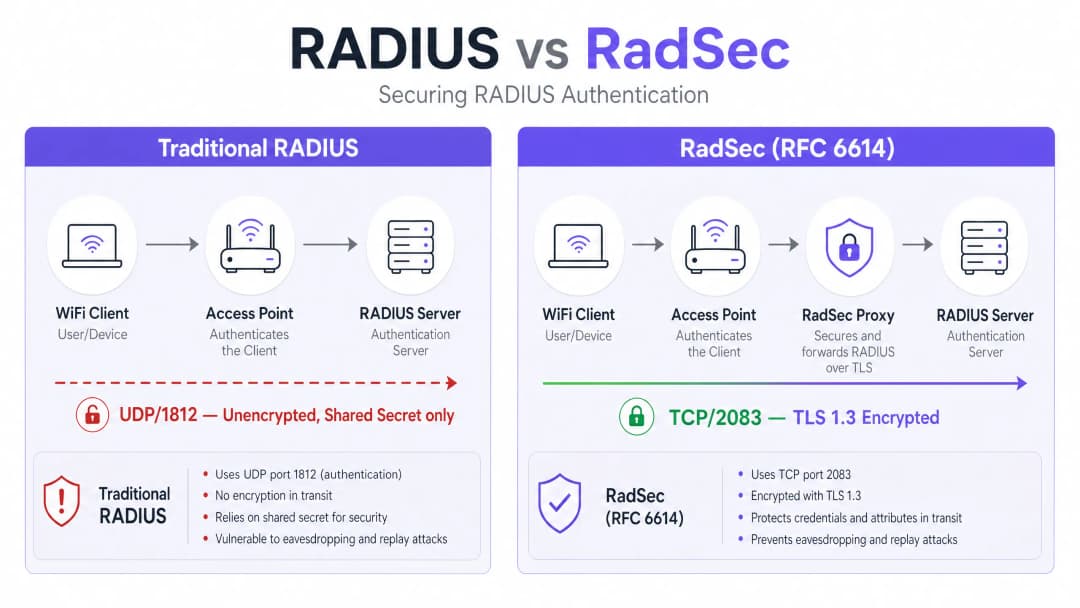
- 傳輸: TCP 連接埠 2083 可確保可靠傳送與狀態連線,從而提高高延遲環境中的效能。
- 加密: TLS 1.2 或 1.3 為所有 RADIUS 屬性提供強健的端對端加密。
- 雙向驗證: RADIUS 用戶端(或代理伺服器)與伺服器皆必須出示由受信任的憑證授權單位 (CA) 簽發的有效 X.509 憑證。保留共享金鑰僅是為了向下相容;TLS 則提供實際的安全性。 此架構對於分散式環境至關重要,例如 零售 連鎖店或 旅宿 場所,在這些環境中,基地台會透過公用網際網路將驗證請求回傳至中央或雲端託管的 RADIUS 伺服器。
實作指南
部署 RadSec 通常遵循以下兩種模式之一:原生支援或代理伺服器模式。
模式 1:原生 RadSec
如果您的基礎架構原生支援(例如 FreeRADIUS 3.0+、Cisco ISE、Aruba ClearPass),您可以在 RADIUS 伺服器和基地台/控制器上直接設定 TLS 憑證。這提供了從邊緣到核心的真正端到端加密。
模式 2:RadSec 代理伺服器
許多舊型的 RADIUS 伺服器(特別是 Microsoft NPS)原生不支援 RadSec。在這些環境中,會部署代理伺服器(例如 radsecproxy)。
- 本地端: AP 將標準的 UDP RADIUS 傳送至本地代理伺服器。
- 廣域網路端: 代理伺服器將流量封裝在 TLS 中,並透過 TCP 2083 傳送至上游伺服器。
此模式可讓您在不更換舊型基礎架構的情況下,確保廣域網路流量的安全。
與 Purple 整合
Purple 的 Guest WiFi 和 WiFi Analytics 平台可與企業級 RADIUS 基礎架構無縫整合。在 Connect 授權下,Purple 可作為 OpenRoaming 的免費識別資訊提供者,而 RadSec 是保護場地與中央樞紐之間聯盟流量安全的強制性要求。
最佳實踐
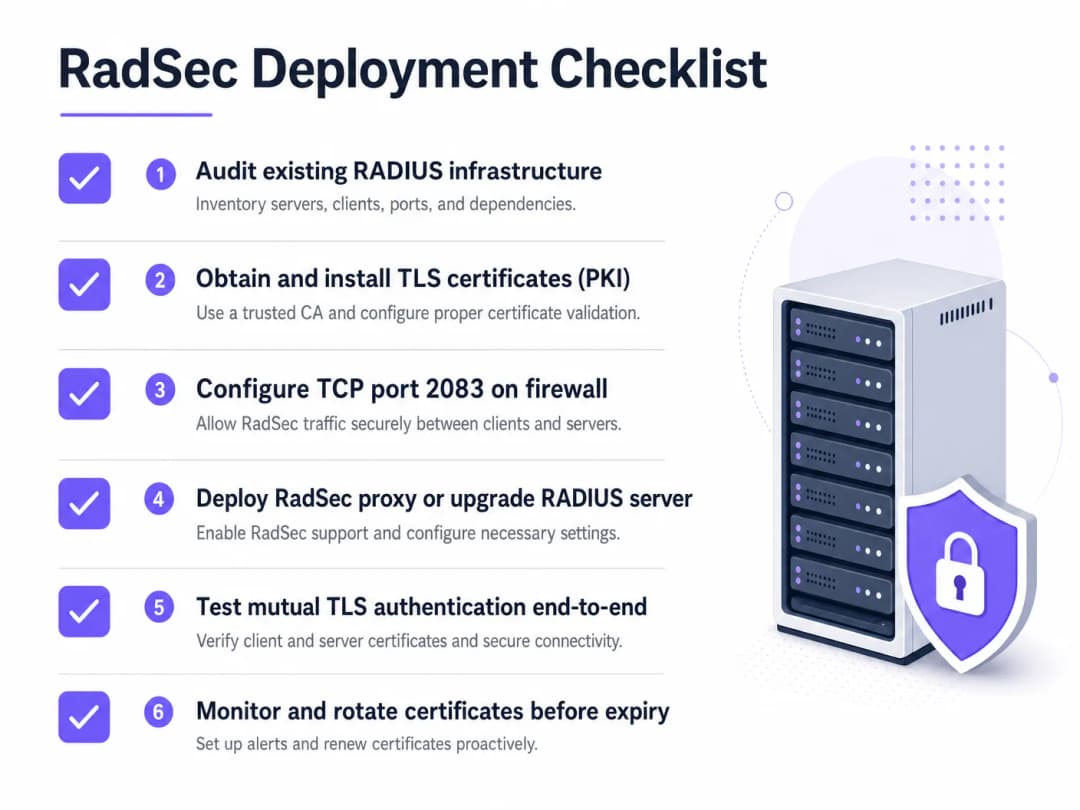
- 憑證生命週期管理: 雙向 TLS 依賴有效的憑證。請實作自動化更新(例如透過 ACME)和嚴格的監控。憑證過期將導致整個驗證服務中斷。
- 防火牆設定: 確保已明確允許從場地連出以及連入 RADIUS 伺服器的 TCP 連接埠 2083。請勿假設現有的 UDP 1812 規則會自動套用。
- 優先處理高風險流量: 在移至本地管理 VLAN 之前,先在跨越公用網際網路或未受信任廣域網路的鏈結上開始部署。
如需深入了解如何確保邊緣安全,請閱讀我們的 基地台安全:您的 2026 企業指南 指南。
疑難排解與風險緩釋
當 RadSec 失敗時,極少是驗證問題,幾乎總是 TLS 或 TCP 問題。
- 症狀: 基地台顯示與 RADIUS 伺服器中斷連線。
- 檢查: TCP 2083 的防火牆規則。傳統 RADIUS 使用 UDP,網路團隊經常忘記開啟 TCP 連接埠。
- 症狀: TCP 連線已建立,但驗證立即失敗。
- **檢查:**憑證驗證。確認通用名稱 (CN) 或主體替代名稱 (SAN) 符合、憑證尚未過期,且用戶端信任簽署的 CA。使用
openssl s_client -connect <server>:2083來除錯交握程序。
- **檢查:**憑證驗證。確認通用名稱 (CN) 或主體替代名稱 (SAN) 符合、憑證尚未過期,且用戶端信任簽署的 CA。使用
確保您的網路基礎穩固。請參閱我們的建議:透過強大的 DNS 與安全性保護您的網路。
投資報酬率與商業影響
導入 RadSec 是一項規避風險的投資。其投資報酬率是以避免資料外洩、合規罰款 (PCI-DSS、GDPR) 以及商譽損失來衡量。此外,它還能加入像是 OpenRoaming 等現代漫遊聯盟,這能顯著提升 醫療照護 與 交通運輸 環境中的訪客體驗。
收聽簡報
若要深入瞭解部署 RadSec 的實際運作狀況,請收聽我們 10 分鐘的技術簡報:
關於用戶端裝置的特定設定步驟,請參閱 如何在 iOS 與 macOS 上以 802.1X 設定企業級 WiFi 或葡萄牙語版本 Como Configurar WiFi Corporativo em iOS e macOS com 802.1X。
關鍵定義
RadSec
RADIUS 協定的擴充功能,將 RADIUS 流量封裝在經由 TCP 連接埠 2083 的 TLS 隧道中。
用於在傳輸跨越不受信任的網路時保護認證流量,防止憑證被攔截。
雙向 TLS (mTLS)
一種安全程序,用戶端與伺服器雙方在建立加密連線之前,均須出示 X.509 憑證以驗證彼此的身分。
RadSec 的核心認證機制,取代了對靜態共用金鑰的依賴。
802.1X
用於基於連接埠之網路存取控制的 IEEE 標準,用於對嘗試連線至區域網路或 WLAN 的裝置進行認證。
依賴 RADIUS (以及延伸的 RadSec) 來向目錄驗證使用者憑證的架構。
radsecproxy
一個充當代理伺服器的開放原始碼精靈程式,可將標準 UDP RADIUS 流量轉換為 RadSec (基于 TCP 的 TLS),反之亦然。
當存取點或舊型 RADIUS 伺服器 (如 Microsoft NPS) 缺少原生 RadSec 支援時部署。
OpenRoaming
由 WiFi Alliance 開發的聯盟標準,允許使用者在全球範圍內無縫且安全地連線至參與的 WiFi 網路。
OpenRoaming 強制要求使用 RadSec 來保護場所與身分識別提供者之間的認證流量。
共用金鑰
傳統 RADIUS 中使用的靜態文字字串,用於模糊化密碼並驗證請求來源。
雖然在 RadSec 設定中為了向下相容性在技術上仍然存在,但已被 TLS 加密取代。
FreeRADIUS
一個廣泛部署的開放原始碼 RADIUS 伺服器,提供對 RadSec 的原生支援。
由於其靈活性與原生 TLS 功能,常用於企業環境和漫遊聯盟中。
PKI (公開金鑰基礎建設)
建立、管理、分發和撤銷數位憑證所需之角色、原則及軟體的架構。
部署 RadSec 的先決條件,因為您必須為所有 RADIUS 用戶端與伺服器發行並管理憑證。
範例
一家擁有 200 家物業的飯店集團集中使用 Microsoft NPS 進行員工認證。目前每家飯店的存取點均透過 UDP 1812 經由公開網際網路傳送 RADIUS 請求。CTO 要求對所有認證流量進行加密,但在今年內無法更換 NPS。
在每個飯店站點部署 RadSec 代理伺服器 (例如 radsecproxy),並在中央資料中心的 NPS 伺服器前部署對應的代理伺服器。本地 AP 將 UDP RADIUS 傳送至本地代理伺服器。本地代理伺服器透過網際網路建立跨 TCP 2083 的雙向 TLS 隧道至中央代理伺服器。中央代理伺服器終止 TLS 隧道,並將標準 UDP RADIUS 轉發至 NPS 伺服器。
一所大型大學正在校園內部署 OpenRoaming,以便為造訪的學者提供無縫存取。他們目前執行 FreeRADIUS 3.0。
在 FreeRADIUS 中啟用原生 RadSec。從 OpenRoaming 聯盟信任的 CA 產生 X.509 憑證。設定校園防火牆以允許輸入和輸出至聯盟中心節點的 TCP 2083 流量。設定無線區域網路控制器,使其對所有指向聯盟的認證請求使用 RadSec。
練習題
Q1. 您的團隊已在遠端分公司存取點(AP)與中央 FreeRADIUS 伺服器之間部署了原生 RadSec。這些 AP 可以 ping 通伺服器,但驗證請求完全逾時,且 RADIUS 記錄中沒有出現任何流量。
提示:RadSec 使用與傳統 RADIUS 不同的傳輸協定和連接埠。
查看標準答案
防火牆可能阻擋了 TCP 連接埠 2083。習慣傳統 RADIUS 的網路團隊通常只允許 UDP 連接埠 1812/1813。您必須明確允許分公司端外流與 RADIUS 伺服器端內流的 TCP 2083 流量。
Q2. 您正在稽核零售用戶的 WiFi 架構。他們在中央使用 Microsoft NPS。其門市 AP 透過 IPsec VPN 經由網際網路傳送驗證請求。這裡需要使用 RadSec 嗎?
提示:考慮已經就緒的加密層。
查看標準答案
雖然使用 RadSec 是最佳實踐,但 IPsec VPN 已經為在不安全網際網路上傳輸的 UDP RADIUS 流量提供了傳輸層加密。在此處部署 RadSec 將提供深度防禦,但與流量原生穿越網際網路的情況相比,其迫切性較低。
Q3. 在成功部署 RadSec 代理伺服器一週後,整個企業的 WiFi 驗證在週一早上 09:00 同時失敗。網路團隊確認防火牆規則未變更。
提示:TLS 通道本身的主要驗證機制是什麼?
查看標準答案
用於雙向 TLS 驗證的 X.509 憑證可能已過期。當憑證過期時,TLS 握手會失敗、TCP 連線會中斷,導致 RADIUS 流量無法傳輸。請實作自動憑證監控與輪替以防止此問題。
繼續閱讀本系列
如何安全地隔離員工與訪客 WiFi 網路:企業區域網路(LAN)最佳實踐
本指南為 IT 經理和網路架構師提供了一個與廠商無關的技術藍圖,旨在透過正確隔離員工與訪客 WiFi 流量來確保企業 LAN 的安全。內容涵蓋 802.1X 驗證、雲端 RADIUS、VLAN 隔離,以及消除共享密碼並保護企業資產所需的憑證生命週期管理。
最佳 DNS filtering:企業綜合指南
本技術參考指南說明企業級 DNS filtering 如何在建立連線之前的解析層阻擋惡意網域,進而保護公共網路的安全。它為 IT 總監、網路架構師和場所營運團隊提供了保護餐飲旅宿、零售和公共部門環境中 Guest WiFi 所需的佈署架構、防火牆設定以及合規性背景。Purple Shield 在 DNS 層級為超過 80,000 個實體場所阻擋惡意軟體、殭屍網路和不當內容。
深入理解 Cisco SUDI:安全網路存取控制中的硬體錨定身分驗證
本指南說明 Cisco SUDI 如何為企業網路基礎設施提供硬體錨定且具密碼編譯安全性的身分。了解如何以不可變的 802.1AR 憑證取代易遭偽造的 MAC 位址,以確保您場域的網路存取控制安全。
對於您的特定設置有任何疑問嗎?
我們的團隊與超過 80,000 個場域的場域營運商、IT 經理和網路工程師合作。立即預約 20 分鐘的通話,我們將向您展示其他與您相似的用戶是如何解決此問題的。