零售 WiFi:店內 WiFi 如何推動銷售、忠誠度和客流量
本權威技術參考指南詳細說明企業 IT 和營運團隊如何將零售 WiFi 部署為策略性商業資產。它涵蓋了從基本連線能力到透過第一方數據擷取、客流分析以及安全、高密度網路架構實現營收創造的基礎設施的轉變。
收聽此指南
查看播客逐字稿
- Executive Summary
- Technical Deep-Dive: Architecture and Standards
- The Radio Access Layer
- Network Infrastructure and Switching
- Authentication and the Captive Portal
- Security and Compliance
- Implementation Guide
- Step 1: Requirements Gathering and Stakeholder Alignment
- Step 2: RF Site Survey and Predictive Modelling
- Step 3: Infrastructure Deployment and Configuration
- Step 4: Captive Portal and CRM Integration
- Step 5: Analytics Calibration and Review
- Best Practices
- Troubleshooting & Risk Mitigation
- ROI & Business Impact

Executive Summary
For modern venue operators and retail enterprises, providing in-store WiFi is no longer merely a utility or a minor customer convenience; it is a critical commercial infrastructure layer. When IT architects and marketing leaders align on deployment, retail store WiFi transforms into a powerful engine for first-party data capture, footfall analytics, and personalised customer engagement.
This guide provides senior IT managers, CTOs, and network architects with a strategic framework for deploying high-density WiFi in retail stores. It moves beyond the basic provisioning of internet access to explore how the network access layer, captive portals, and analytics integrations combine to deliver measurable Return on Investment (ROI). We will examine the technical architecture required to support hundreds of simultaneous connections securely, the compliance mandates governing data collection, and the integration of platforms like Purple's Guest WiFi to drive loyalty and sales. Whether you are upgrading a single flagship location or standardising infrastructure across a global retail chain, this reference outlines the vendor-neutral best practices and architectural decisions necessary to build a network that serves both the user and the business.
Technical Deep-Dive: Architecture and Standards
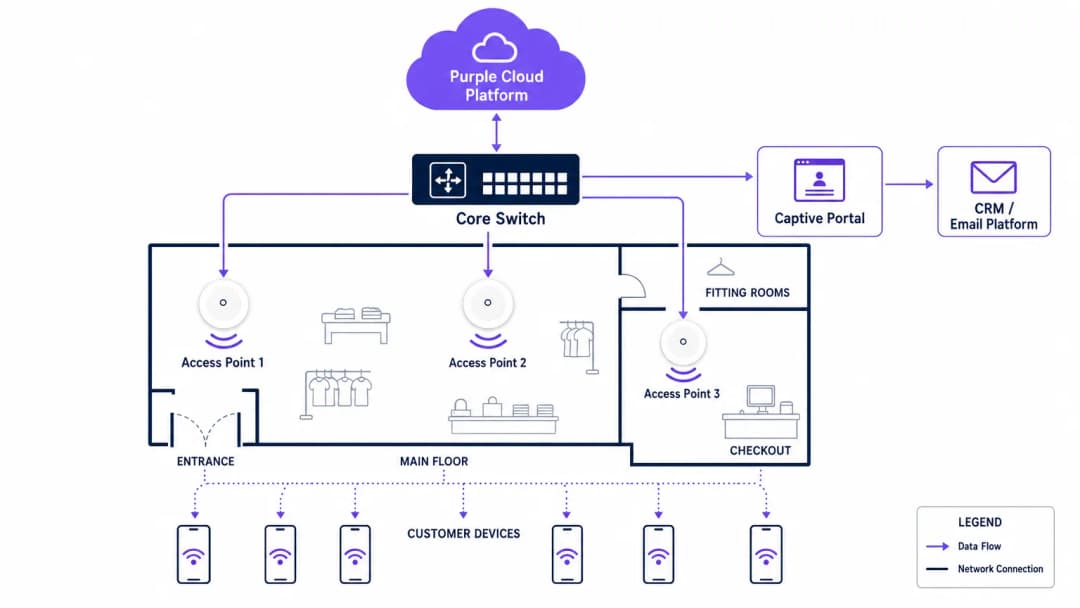
A robust retail WiFi deployment requires a structured, multi-tiered architecture to ensure reliability, security, and data extraction capabilities. The infrastructure must support high client density while maintaining strict isolation between guest traffic and corporate or Point-of-Sale (POS) systems.
The Radio Access Layer
The foundation of any modern retail deployment is the radio access layer, which must be built on the IEEE 802.11ax standard, commercially known as Wi-Fi 6. For any new deployment in retail stores with WiFi, Wi-Fi 6 is the mandatory baseline. Its primary advantage in retail environments is not merely peak throughput, but its ability to handle high client density efficiently through Orthogonal Frequency-Division Multiple Access (OFDMA) and Basic Service Set (BSS) Colouring.
OFDMA allows a single wireless channel to be divided into smaller sub-channels, enabling an access point to communicate with multiple client devices simultaneously. In a busy retail environment, such as a department store during a peak trading period, this prevents the network degradation that plagued older Wi-Fi 5 deployments. BSS Colouring mitigates co-channel interference, which is particularly critical in multi-tenant retail parks where adjacent networks often overlap.
Network Infrastructure and Switching
Access points must connect back to a resilient wired infrastructure. Core and edge switches should provide adequate Power over Ethernet (PoE+) to support modern access points, alongside sufficient uplink capacity. A standard mid-sized retail store requires at least a 1-Gigabit uplink from edge to core, while high-density environments or flagship stores should aggregate at 10-Gigabit speeds.
The external internet circuit is frequently a neglected bottleneck. Venue operators should prioritise dedicated, symmetrical connections. As detailed in our guide on What Is a Leased Line? Dedicated Business Internet , a dedicated circuit provides the Service Level Agreements (SLAs) necessary to guarantee uptime for both guest services and critical retail operations.

Authentication and the Captive Portal
The captive portal is the critical interface where technical infrastructure meets commercial strategy. When a user connects to the guest network, they are intercepted and redirected to a branded portal requiring authentication. This is the mechanism for capturing first-party data.
Authentication methods typically include email, SMS, or social login, though email remains the most robust for long-term CRM integration. The portal must operate over HTTPS to secure user credentials in transit. Furthermore, the authentication process must integrate seamlessly with a WiFi Analytics backend to correlate the device's MAC address with the authenticated user profile, enabling subsequent behavioural tracking.
Security and Compliance
Security in a retail WiFi environment is twofold: protecting the corporate network and protecting the guest.
- Network Segmentation: Guest traffic must be logically isolated from corporate and POS traffic using Virtual Local Area Networks (VLANs). This is a mandatory requirement for Payment Card Industry Data Security Standard (PCI DSS) compliance. Mixing guest and payment traffic on the same subnet will result in an immediate audit failure.
- Encryption Standards: While open networks with captive portals remain common, the industry is shifting towards WPA3 encryption. WPA3-SAE (Simultaneous Authentication of Equals) provides forward secrecy, protecting past sessions even if a password is compromised. For enterprise devices, 802.1X authentication should be strictly enforced.
- Data Privacy (GDPR): The collection of first-party data via the captive portal must comply with regional privacy regulations, such as the GDPR in Europe. Consent must be explicitly given, specific, and unbundled from general terms and conditions. The WiFi platform provider must act as a compliant data processor.
Implementation Guide
Deploying a commercial-grade WiFi network requires a systematic approach to ensure both technical performance and business alignment.
Step 1: Requirements Gathering and Stakeholder Alignment
IT must not operate in a silo. Before selecting hardware, IT architects must align with marketing and operations directors to define the commercial objectives. Determine the required data capture fields for the captive portal, the integration points with existing CRM systems, and the specific analytics required (e.g., dwell time, zone flow).
Step 2: RF Site Survey and Predictive Modelling
A professional Radio Frequency (RF) site survey is non-negotiable. Relying on floor plans to estimate access point placement often results in coverage gaps in critical areas like fitting rooms or checkout queues.
Engineers should use predictive modelling software, followed by an active on-site survey, to account for attenuation caused by shelving, inventory, and architectural features. A general rule of thumb is one access point per 150-200 square metres, but high-density zones require specific capacity planning rather than just coverage planning.
Step 3: Infrastructure Deployment and Configuration
During physical installation, ensure all cabling meets Cat6a standards to support future multi-gigabit access points. Configure the network controllers to enforce client isolation on the guest VLAN, preventing peer-to-peer communication between connected devices. Implement Quality of Service (QoS) policies to throttle guest bandwidth, ensuring that critical retail operations (such as inventory scanners and POS terminals) receive priority.
Step 4: Captive Portal and CRM Integration
Design the captive portal to reflect the brand's identity while minimising friction. Keep data capture fields to a minimum—typically name and email address—to maximise conversion rates. Integrate the portal with the brand's CRM or marketing automation platform via API. This ensures that when a customer authenticates, their profile is immediately updated or created in the central database, triggering automated welcome workflows or loyalty program integrations.
Step 5: Analytics Calibration and Review
Once the network is live, calibrate the analytics platform to define specific physical zones within the store (e.g., 'Menswear', 'Entrance', 'Checkout'). Establish a monthly review cadence where IT and marketing teams analyse footfall trends, dwell times, and network performance metrics to refine both the network configuration and the store layout.

Best Practices
To maximise the ROI of retail WiFi, adhere to the following industry best practices:
- Prioritise First-Party Data: With the deprecation of third-party cookies, in-store WiFi is one of the most reliable sources of first-party data. Ensure your captive portal strategy is optimised for consent-driven data capture.
- Implement Profile-Based Authentication: Moving towards seamless, secure authentication methods, such as Passpoint (Hotspot 2.0), allows users to connect automatically across different venues without repeatedly navigating captive portals, significantly improving the user experience and data continuity.
- Leverage Location Analytics: Use the presence data generated by connected devices to understand customer flow. As seen in Retail environments, analysing which aisles receive the most traffic can inform merchandising and staffing decisions.
- Ensure Vendor Neutrality: Choose an analytics and captive portal overlay, like Purple, that is hardware-agnostic. This prevents vendor lock-in at the infrastructure layer and allows for standardised analytics across a mixed-hardware estate.
Troubleshooting & Risk Mitigation
Even well-designed networks encounter issues. Understanding common failure modes is essential for maintaining service continuity.
| Failure Mode | Symptom | Root Cause & Mitigation |
|---|---|---|
| Captive Portal Failure | Users connect to the SSID but receive no internet access and no login prompt. | Cause: DNS redirection failure or SSL certificate errors on the portal controller. Mitigation: Ensure the Walled Garden configuration allows DNS resolution and access to the portal's IP/hostname before authentication. Verify SSL certificates are valid and trusted. |
| High-Density Degradation | Slow throughput and frequent disconnects during peak trading hours. | Cause: Co-channel interference or insufficient AP capacity (too many clients per radio). Mitigation: Implement dynamic channel assignment. Upgrade to Wi-Fi 6 access points. Reduce transmit power to shrink cell sizes and encourage roaming to less congested APs. |
| Rogue Access Points | Unauthorised networks appearing with similar SSIDs (Evil Twin attacks). | Cause: Malicious actors attempting to intercept guest credentials. Mitigation: Enable Wireless Intrusion Prevention Systems (WIPS) on the network controller to detect and suppress rogue APs automatically. |
| VLAN Leakage | Guest devices can ping corporate IP addresses. | Cause: Misconfigured switch ports or missing Access Control Lists (ACLs) on the core router. Mitigation: Conduct regular penetration testing. Strictly enforce client isolation and verify ACLs block all RFC 1918 private address space from the guest VLAN. |
ROI & Business Impact
The ultimate measure of a retail WiFi deployment is its impact on the bottom line. IT leaders must articulate this value to the wider business.
- Increased Dwell Time: Reliable WiFi encourages customers to spend more time in-store, which directly correlates with increased basket size.
- Marketing Attribution: By tracking device MAC addresses, retailers can measure the offline impact of online campaigns. If a customer receives a promotional email and visits the store three days later, the WiFi network provides the attribution data.
- Loyalty Acquisition: The captive portal is a high-conversion acquisition channel for loyalty programs. Offering high-speed access in exchange for loyalty registration rapidly scales the program's user base.
- Operational Efficiency: Footfall analytics enable dynamic staffing models, ensuring adequate coverage during peak periods and reducing wage costs during quiet times.
By treating in-store WiFi as a strategic asset rather than a sunk cost, retail enterprises can build a network that not only connects devices but fundamentally drives sales, loyalty, and operational intelligence.
關鍵定義
Captive Portal
一個公共存取網路的使用者在獲得存取權限之前必須檢視並與之互動的網頁。它是身份驗證、接受服務條款和數據擷取的主要機制。
IT 團隊部署 Captive Portal 來保護網路並確保法律合規性,而行銷團隊則使用它們來獲取客戶數據並推動忠誠度計劃註冊。
MAC Address (Media Access Control)
一個分配給網路介面控制器 (NIC) 的唯一識別碼,用於在網路段內的通訊中作為網路位址。
在零售 WiFi 分析中,MAC 位址用於匿名追蹤裝置在商店內的移動,提供停留時間和重複拜訪的數據,即使使用者尚未進行身份驗證。
Wi-Fi 6 (802.11ax)
Wi-Fi 標準的第六代,專門設計用於透過 OFDMA 和 BSS 著色等技術改善高密度環境中的效能。
當升級零售基礎設施時,IT 經理會指定 Wi-Fi 6,以確保網路能夠處理數百名同時購物的顧客,而不會降低效能。
VLAN (Virtual Local Area Network)
一個邏輯子網路,將來自不同實體 LAN 的一組裝置群組在一起。它允許網路管理員劃分單一交換式網路,以符合其系統的功能和安全性要求。
VLAN 在零售業中至關重要,用於將不受信任的訪客 WiFi 流量與高度敏感的銷售點 (POS) 流量分開,以確保 PCI DSS 合規性。
First-Party Data
公司直接從其客戶收集並完全擁有的資訊,例如電子郵件地址、購買歷史記錄和 WiFi 連線階段數據。
隨著第三方追蹤 Cookie 的式微,零售行銷人員高度依賴訪客 WiFi 網路來擷取第一方數據以進行目標式行銷活動。
Walled Garden
一種網路組態,允許未經身份驗證的使用者存取一組有限的特定網站或 IP 位址,同時封鎖所有其他網際網路存取。
IT 團隊設定 Walled Garden,以便使用者在網路上獲得完全授權之前,可以存取 Captive Portal 登入頁面和必要的身份驗證服務(例如社交媒體 API)。
Dwell Time
客戶在商店特定區域花費的時間長度,透過追蹤其裝置與 WiFi 存取點的連線或探測請求來衡量。
營運總監使用停留時間分析來評估商店佈局、櫥窗展示和促銷端架的有效性。
PCI DSS (Payment Card Industry Data Security Standard)
一項適用於處理來自主要信用卡組織之品牌信用卡的組織的資訊安全標準。
IT 架構師必須設計零售網路,以確保訪客 WiFi 存取不會危害支付基礎設施的安全,避免嚴重的財務罰款。
範例
一家擁有 50 個據點的全國性零售連鎖店,在其目前的訪客 WiFi 網路上正經歷低行銷選擇加入率(低於 5%),該網路使用一個通用的、無品牌的啟動頁面。CTO 需要增加數據擷取以支援新的全通路忠誠度計劃。
IT 團隊在所有 50 個據點部署了一個集中式、與硬體無關的 Captive Portal 解決方案。他們以一個品牌化、回應式的入口網站取代了通用的啟動頁面,該入口網站清楚地闡明了價值交換:「登入即可獲得免費高速 WiFi 和一個立即的 10% 折扣碼」。入口網站設定為僅擷取姓名和電子郵件,減少了摩擦。關鍵的是,該平台透過 API 與零售商的 CRM 整合。當使用者進行身份驗證時,他們的詳細資料會被推送到 CRM,觸發一封包含折扣碼的自動化電子郵件。網路還設定為記住裝置的 MAC 位址,允許在後續拜訪任何一個據點時進行無縫身份驗證。
一家大型百貨公司在週末遭受嚴重的網路壅塞。客戶抱怨訪客 WiFi 無法使用,而商店經理回報 POS 終端機(共享實體網路基礎設施)偶爾會斷線。
網路架構師進行 RF 頻譜分析,發現嚴重的同頻干擾和 AP 飽和。補救計劃包含三個步驟:1) 將最高密度區域(美食街、主入口)升級至 Wi-Fi 6 存取點以利用 OFDMA。2) 在核心路由器上實施嚴格的 QoS 政策,保證 POS VLAN 的頻寬,並將訪客 VLAN 流量限制為每個客戶端 5 Mbps。3) 啟用動態頻道分配並降低存取點的傳輸功率以縮小細胞大小,鼓勵客戶端裝置更有效地漫遊並減少重疊。
練習題
Q1. 您的零售客戶想要實施一個訪客 WiFi 網路來擷取客戶電子郵件。他們計劃使用其現有的扁平化網路架構,將新的訪客存取點直接連接到處理 POS 終端機的同一台交換器,而不進行 VLAN 分段。這種方法的主要風險是什麼?
提示:考慮處理支付所需的安全標準。
查看標準答案
主要風險是嚴重違反 PCI DSS 合規性。扁平化網路允許不受信任的訪客裝置可能與 POS 終端機通訊或攔截來自其的流量。必須使用 VLAN 對網路進行分段,以將持卡人數據環境與訪客網路隔離開來。
Q2. 一位場館營運商注意到,雖然商店的客流量很高,但 Captive Portal 的擷取率低於 2%。入口網站目前要求提供名字、姓氏、電子郵件、電話號碼、出生日期和郵遞區號。IT 和行銷團隊應該如何解決這個問題?
提示:考慮身份驗證過程中的摩擦。
查看標準答案
低擷取率是由於身份驗證過程中過多的摩擦。團隊應重新設計 Captive Portal,僅要求最少的必要資訊——通常僅需姓名和電子郵件,或提供社交登入選項。一旦建立了初步關係,之後可以使用漸進式資料收集來獲取更多詳細資訊。
Q3. 一個在繁忙購物中心新部署的 Wi-Fi 6 網路效能不佳。IT 經理注意到所有存取點都在 2.4GHz 頻段上以最大功率傳輸。需要進行什麼組態變更?
提示:思考 RF 訊號在密集環境中如何互動。
查看標準答案
存取點很可能因為其細胞大小過大且重疊而導致嚴重的同頻干擾。IT 經理應降低存取點上的傳輸功率,尤其是在 2.4GHz 頻段上,以縮小細胞大小。他們還應確保啟用動態頻道分配,並鼓勵客戶端在可能的情況下轉向 5GHz 頻段。
繼續閱讀本系列
員工 WiFi 對比訪客 WiFi:企業網路分段的最佳實踐
為 IT 領導者提供的全面技術指南,探討如何對員工和訪客 WiFi 網路進行分段。內容涵蓋 VLAN 架構、802.1X 驗證、防火牆策略,以及安全網路設計對業務的影響。
Apartment WiFi 解決方案:企業完整指南
本指南涵蓋了 Build to Rent(BTR)和多住戶住宅(MDU)物業中 Apartment WiFi 解決方案的架構、部署和商業案例。它解釋了 Identity Pre-Shared Key (iPSK) 技術如何為每位住戶建立安全、隔離的網路泡泡,同時支援智慧裝置和物聯網。物業開發商、房東和 BTR 營運商將能在此獲得具體的部署指引、ROI 數據和實際執行情境。
Cox business managed WiFi:企業必備的完整指南
本指南詳細介紹建商與 BTR(建屋出租)營運商如何利用 Cox Business 的託管型 WiFi 部署具備擴充性且安全的網路。內容涵蓋網路架構、中立品牌硬體部署,以及將網路連接從營運痛點轉化為可靠基礎設施後對業務帶來的實質影響。